

Simplify LLD Network Design with Synapse Grid. Create AI-powered network diagrams, streamline topology mapping, and improve network documentation.
Introduction
Designing a reliable enterprise network requires more than connecting routers, switches, and firewalls. Every connection, device role, and configuration must be carefully planned to ensure network performance, security, and scalability.
This is where LLD network design becomes essential.
Low-Level Design (LLD) provides the technical details needed to transform network architecture into an implementable infrastructure plan. However, preparing accurate diagrams, mapping hardware connections, and maintaining consistent documentation can be time-consuming when performed manually.
Synapse Grid by CogniKor introduces an AI-powered approach to network topology design, helping organisations transform hardware information into structured network diagrams, intelligent connection maps, and documentation-ready visuals.
What Is LLD Network Design?
LLD network design, or Low-Level Design, is the detailed technical planning process used to define how network infrastructure will be implemented.
While a high-level network architecture explains the overall structure, an LLD document focuses on the individual components, physical connections, logical relationships, and configuration details required for deployment.
A typical LLD network design includes:
- Device specifications: Routers, switches, firewalls, and other network hardware.
- IP addressing: Subnets, VLANs, gateways, and addressing schemes.
- Physical connectivity: Interface assignments, cabling paths, and port connections.
- Routing architecture: Routing protocols, network paths, and redundancy planning.
- Security configuration: Access control lists, firewall policies, and segmentation requirements.
- Network topology diagrams: Detailed representations of physical and logical connections.
- High-availability planning: Failover links, redundant devices, and resilient connectivity.
A well-structured LLD helps network engineers understand exactly how infrastructure components should connect and operate before deployment begins.
HLD vs LLD in Network Design: Key Differences
High-Level Design (HLD) and Low-Level Design (LLD) are two important stages of network architecture planning.
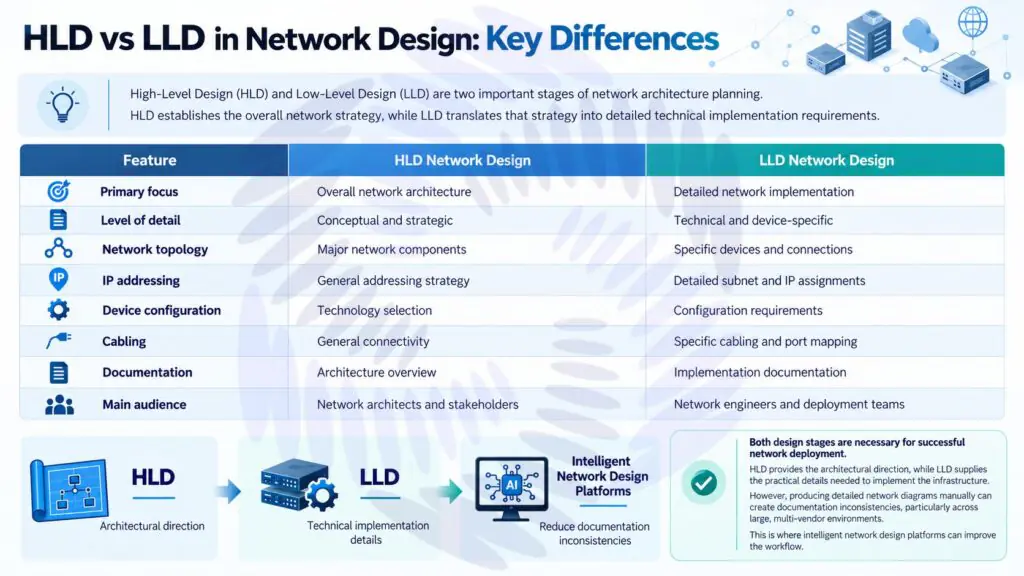
HLD establishes the overall network strategy, while LLD translates that strategy into detailed technical implementation requirements.
| Feature | HLD Network Design | LLD Network Design |
| Primary focus | Overall network architecture | Detailed network implementation |
| Level of detail | Conceptual and strategic | Technical and device-specific |
| Network topology | Major network components | Specific devices and connections |
| IP addressing | General addressing strategy | Detailed subnet and IP assignments |
| Device configuration | Technology selection | Configuration requirements |
| Cabling | General connectivity | Specific cabling and port mapping |
| Documentation | Architecture overview | Implementation documentation |
| Main audience | Network architects and stakeholders | Network engineers and deployment teams |
Both design stages are necessary for successful network deployment.
HLD provides the architectural direction, while LLD supplies the practical details needed to implement the infrastructure.
However, producing detailed network diagrams manually can create documentation inconsistencies, particularly across large, multi-vendor environments.
This is where intelligent network design platforms can improve the workflow.
How Synapse Grid Simplifies LLD Network Design
Synapse Grid is an AI-powered network topology design platform developed by CogniKor to simplify enterprise network planning and visual documentation.
Rather than manually arranging every network component, engineers can use Synapse Grid to convert hardware inventories, device specifications, or existing network sketches into structured network architecture diagrams.
The platform combines intelligent device recognition, logical relationship mapping, and dynamic topology generation to make complex network environments easier to understand.
Key capabilities include:
- AI-powered topology generation: Converts network hardware information into organised architecture diagrams.
- Intelligent connection mapping: Identifies device relationships and logical connectivity.
- Multi-vendor support: Works with networking equipment from manufacturers such as Cisco, Fortinet, HPE Aruba, and Huawei.
- Dynamic network visualisation: Allows users to modify nodes and connections within an interactive topology.
- Documentation-ready exports: Generates network diagrams suitable for inclusion in HLD and LLD documentation.
Synapse Grid focuses on making the network design and diagramming stages more efficient. Detailed configuration information, such as IP plans and routing policies, can be incorporated into the broader LLD documentation process.
Key Features of Synapse Grid for LLD Network Design
Synapse Grid provides intelligent features designed to simplify the creation and management of enterprise network diagrams.
1. Logic-Aware Network Discovery
Understanding relationships between network devices is essential when developing an accurate LLD topology.
Synapse Grid uses logic-aware discovery to identify device relationships, high-availability connections, redundancy paths, and logical dependencies.
This helps engineers:
- Visualise network device relationships.
- Identify redundant network paths.
- Understand high-availability structures.
- Maintain consistent network diagrams.
- Improve infrastructure planning accuracy.
2. Multi-Vendor Device Recognition
Enterprise networks often contain hardware from multiple manufacturers.
Manually organising devices from different vendors can complicate network documentation.
Synapse Grid supports multi-vendor fingerprinting to assign appropriate device roles, icons, and architectural layer positions based on hardware capabilities.
Supported vendor environments include:
- Cisco
- Fortinet
- HPE Aruba
- Huawei
This enables engineers to create more consistent diagrams across mixed network environments.
3. Dynamic Network Hierarchy
Organising devices into logical network layers improves documentation clarity.
Synapse Grid automatically arranges network components into structured architectural layers.
| Network Layer | Primary Purpose |
| WAN | External network connectivity |
| Edge | Network perimeter and external access |
| Core | High-speed network backbone |
| Distribution | Network aggregation and policy boundaries |
| Access | Connectivity for users and endpoint devices |
This hierarchical approach helps engineers understand how network components relate to each other across enterprise infrastructure.
4. Interactive Network Topology
Traditional static diagrams can become outdated as infrastructure changes.
Synapse Grid provides dynamic SVG-based network diagrams that allow users to modify network nodes and links.
The platform recalculates topology paths and layout relationships when changes are made, helping maintain organised visual documentation.
5. Intelligent Cable Mapping
Incorrect or unclear connections can create deployment difficulties.
Synapse Grid includes smart cable snapping, which aligns network links with relevant logical ports.
The platform also visually differentiates connection types, including:
- 100G fibre
- MPLS
- Copper
- Management connections
These capabilities make network connectivity easier to interpret during design reviews and infrastructure planning.
6. Documentation-Ready Network Exports
Network documentation should be easy to review, share, and maintain.
Synapse Grid supports exporting network diagrams in several formats.
| Export Format | Recommended Use |
| Network design documentation and reviews | |
| SVG | Scalable, high-quality network diagrams |
| PNG | Presentations and technical reports |
| JPEG | General visual sharing and documentation |
These exports help teams incorporate topology diagrams into their existing LLD network design documents.
How to Create Network Topology Diagrams with Synapse Grid
Synapse Grid follows a structured four-stage workflow, helping network engineers move from hardware information to organised network diagrams.
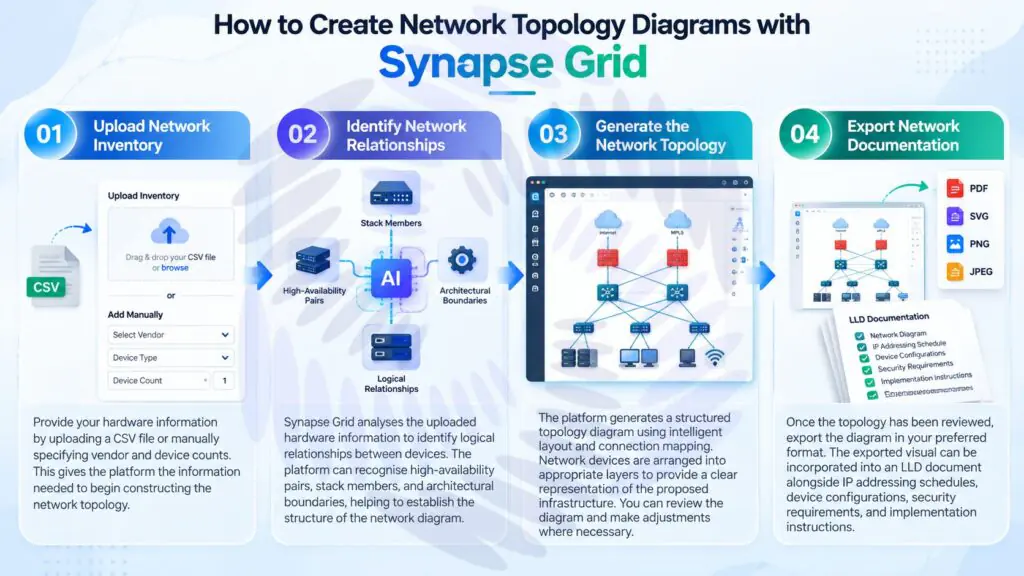
Step 1: Upload Network Inventory
Begin by providing the required hardware information.
Users can upload device inventory information through CSV files or manually specify vendor and device counts.
This gives the platform the information needed to begin constructing the network topology.
Step 2: Identify Network Relationships
Synapse Grid analyses the uploaded hardware information to identify logical relationships between devices.
The platform can recognise high-availability pairs, stack members, and architectural boundaries.
These relationships help establish the structure of the network diagram.
Step 3: Generate the Network Topology
The platform generates a structured topology diagram using intelligent layout and connection mapping.
Network devices are arranged into appropriate layers to provide a clear representation of the proposed infrastructure.
Engineers can review the diagram and make adjustments where necessary.
Step 4: Export Network Documentation
Once the topology has been reviewed, users can export the diagram in their preferred format.
The exported visual can be incorporated into an LLD document alongside IP addressing schedules, device configurations, security requirements, and implementation instructions.
Benefits of Using Synapse Grid for Enterprise Network Design
Adopting an intelligent topology design platform can improve how network teams prepare and maintain technical documentation.
Faster Network Diagram Creation
Creating detailed enterprise network diagrams manually can require significant engineering effort.
Synapse Grid is designed to automate topology generation and reduce repetitive diagramming tasks.
CogniKor reports network design generation in under two minutes for supported workflows, compared with manual processes that may take several days. Actual completion times depend on the complexity and requirements of the project.
Improved Visual Consistency
A consistent network diagram is easier to interpret, review, and maintain.
Synapse Grid organises network devices and connections using logical architectural relationships, reducing the need for extensive manual layout adjustments.
Better Support for Complex Networks
Large organisations often manage hundreds or thousands of connected devices across multiple sites.
Synapse Grid is designed to support enterprise-scale topologies, with features such as global node search and dynamic hierarchy management.
Easier Network Documentation Updates
Network environments change as organisations expand, replace hardware, and introduce new connectivity requirements.
The platform’s interactive diagrams and real-time layout recalculation help engineers keep visual topology documentation aligned with infrastructure changes.
More Efficient Design Reviews
Clear and structured network diagrams support communication between architects, engineers, and project stakeholders.
With exportable visuals and logically organised network components, teams can review network connectivity and architectural relationships more effectively.
Traditional LLD Diagramming vs Synapse Grid
The following comparison highlights the differences between manual network diagramming and Synapse Grid’s AI-assisted approach.
| Capability | Traditional Manual Diagramming | Synapse Grid |
| Topology generation | Manual arrangement | AI-assisted generation |
| Device organisation | Engineer-defined layout | Automatic hierarchy |
| Multi-vendor representation | Manual icon and role selection | Multi-vendor fingerprinting |
| Connection mapping | Manual link creation | Intelligent relationship mapping |
| Layout updates | Manual repositioning | Dynamic recalculation |
| Large topology navigation | Depends on diagramming tool | Global node search |
| Documentation exports | Depends on software | PDF, SVG, PNG, JPEG |
| Design workflow | Highly dependent on manual effort | Automation-assisted |
Synapse Grid helps automate topology visualisation, while network engineers remain responsible for validating infrastructure requirements and completing technical implementation specifications.
Why Choose Synapse Grid for LLD Network Design?
Network engineers need tools that provide both visual clarity and the flexibility to manage complex infrastructure.
Synapse Grid combines intelligent network topology generation with features designed for enterprise environments.
Its strengths include:
- Intelligent automation: Reduces repetitive work involved in network diagram creation.
- Scalable visualisation: Supports complex and large-scale network topologies.
- Flexible hardware support: Organises equipment from multiple networking vendors.
- High-availability awareness: Recognises redundant connections and logical boundaries.
- Professional documentation: Produces exportable diagrams for network design records.
For organisations developing LLD documentation, Synapse Grid offers a practical way to simplify the topology design component of the process.
Explore Synapse Grid by CogniKor to discover how intelligent network design can support your infrastructure planning workflow.
FAQ’s About LLD Network Design
Start with approved network requirements and a hardware inventory. Identify device roles, connectivity requirements, logical network layers, and redundant paths. Create the network topology, validate the connections, and incorporate the diagram into the broader LLD documentation.
Yes. AI-powered tools can help automate network topology generation, device classification, connection mapping, and visual documentation. Engineering validation is still necessary for final implementation details.
The best tool depends on network complexity and documentation requirements. Synapse Grid is an option for organisations seeking AI-assisted topology generation, multi-vendor device organisation, and documentation-ready diagram exports.
Yes. Synapse Grid supports network design workflows involving equipment from vendors including Cisco, Fortinet, HPE Aruba, and Huawei.
Yes. Synapse Grid generates structured network topology diagrams and supports PDF, SVG, PNG, and JPEG exports. These visuals can be included in LLD documentation alongside detailed configuration and deployment requirements.
Conclusion
LLD network design plays a critical role in translating network architecture into practical implementation requirements. Accurate documentation, organised topology diagrams, and clearly defined network connections help engineering teams build reliable and scalable infrastructure.
However, manually creating and maintaining network diagrams can become increasingly complex as enterprise networks expand.
Synapse Grid by CogniKor offers an AI-powered approach that simplifies network topology generation, intelligent device organisation, and visual documentation.
By combining dynamic network layouts, multi-vendor recognition, logical connection mapping, and flexible export options, Synapse Grid helps engineering teams prepare clearer network diagrams while reducing repetitive design work.
Whether you are planning a new enterprise network or documenting an existing infrastructure, Synapse Grid can support a more efficient network design workflow.
Ready to simplify your network design process?
Explore Synapse Grid and discover a smarter approach to enterprise network topology design.