
Explore network documentation software with Synapse Grid. Create AI-powered topology maps, organize device connections, and export clear network diagrams.
Introduction
Managing a business network becomes more difficult as the number of devices, connections, and locations increases. Network engineers need accurate documentation to understand how everything connects and works together.
Traditional network documentation often involves spreadsheets, manually created diagrams, and regular updates. These methods take time and can become difficult to manage when network designs change.
Network documentation software helps businesses organize network information, understand device relationships, and create clear infrastructure diagrams.
Synapse Grid by CogniKor makes topology documentation easier with AI-powered network design, automated connection mapping, and structured network diagrams. It transforms hardware information into useful network architecture, helping IT teams plan, understand, and document complex networks.
What Is Network Documentation Software?
Network documentation software is a tool that helps IT teams record, organize, and visualize their network infrastructure.
It provides information about network devices, connections, configurations, and how different parts of a network work together.
Instead of depending only on spreadsheets or manually drawn diagrams, businesses can use software to create more structured network documentation.
Common types of network information include:
- Network devices: Routers, switches, firewalls, servers, and access points.
- Network topology: Visual diagrams showing how network devices connect.
- Device relationships: Information about connections and dependencies between devices.
- IP addresses and subnets: Details about network addressing.
- Physical connections: Cabling, ports, and hardware links.
- Logical connections: Network layers, traffic paths, and relationships between systems.
Different documentation tools support different parts of this information.
Some tools focus on device records and configuration management, while others specialize in topology visualization and network architecture.
Why Is Network Documentation Important?
Network documentation provides a clear understanding of IT infrastructure. It helps technical teams make better decisions when maintaining, troubleshooting, or expanding networks.
Without reliable documentation, engineers may spend unnecessary time identifying connections or understanding how a network was designed.
Here are some important benefits:
- Better network visibility: Engineers can understand device connections and the overall network structure.
- Faster troubleshooting: Clear topology diagrams help teams identify possible problem areas and affected connections.
- Easier network planning: Businesses can review their existing architecture before making changes.
- Improved teamwork: Network documentation allows different engineers to understand the same infrastructure.
- Reduced manual work: Automated diagram creation reduces the need to draw every connection individually.
- Simpler network expansion: Organized documentation makes it easier to plan additional devices and network locations.
Good documentation is particularly useful for businesses managing large networks with different hardware vendors.
What Should Good Network Documentation Include?
Useful network documentation should provide more than a simple list of devices.
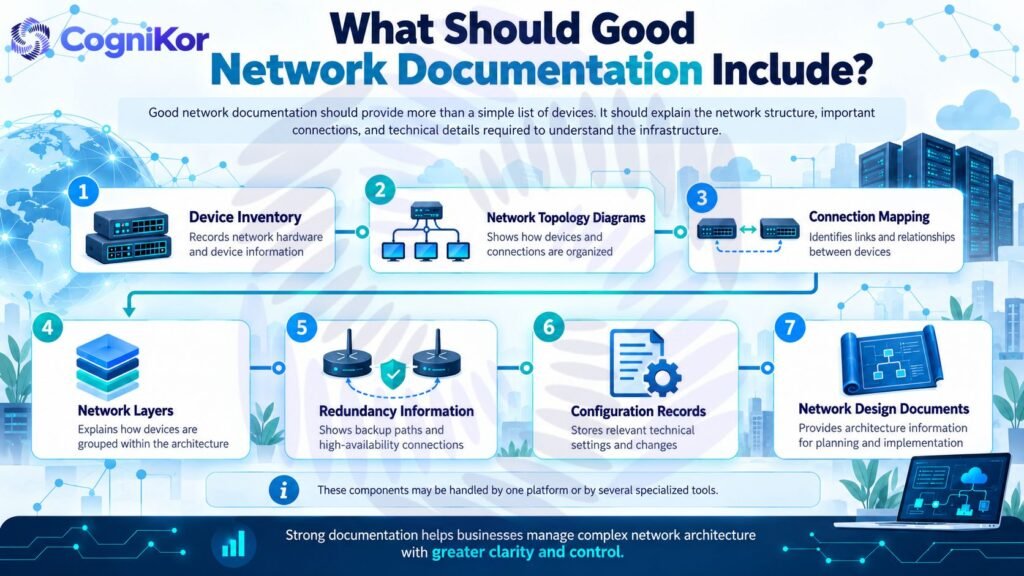
It should explain the network structure, important connections, and technical details required to understand the infrastructure.
| Documentation Component | Purpose |
| Device Inventory | Records network hardware and device information |
| Network Topology Diagrams | Shows how devices and connections are organized |
| Connection Mapping | Identifies links and relationships between devices |
| Network Layers | Explains how devices are grouped within the architecture |
| Redundancy Information | Shows backup paths and high-availability connections |
| Configuration Records | Stores relevant technical settings and changes |
| Network Design Documents | Provides architecture information for planning and implementation |
These components may be handled by one platform or by several specialized tools.
For businesses working with complex network architecture, clear topology diagrams and logical connection mapping are especially important.
Synapse Grid: AI-Powered Network Documentation Software
Synapse Grid is an AI-powered network design and topology platform developed by CogniKor.
It helps engineers turn hardware inventories, network specifications, and device information into structured network diagrams.
Unlike basic diagramming tools, Synapse Grid focuses on understanding relationships between network devices.
It uses AI-assisted logic to organize the network and identify important architectural connections.
With Synapse Grid, businesses can:
- Convert hardware inventory into network topology diagrams.
- Organize devices into logical network layers.
- Identify high-availability pairs and redundant paths.
- Map connections and dependencies between devices.
- Work with hardware from multiple network vendors.
- Adjust network layouts as architecture information changes.
- Export diagrams for technical network documentation.
The goal is to make network documentation easier to create, understand, and maintain during design changes.
Key Features of Synapse Grid for Network Documentation
Synapse Grid includes several features designed to simplify network architecture and documentation tasks.
1. AI-Powered Network Topology Generation
Creating large network diagrams manually can require considerable engineering work.
Synapse Grid uses hardware information to generate structured topology diagrams with automated device placement and connection mapping.
This reduces repetitive drawing work and gives engineers a clearer starting point for documenting their infrastructure.
2. Intelligent Device Relationship Mapping
Understanding how devices relate to one another is an important part of network documentation.
Synapse Grid uses logic-aware analysis to identify relationships such as:
- High-availability (HA) pairs
- Redundant network paths
- Stack members
- Logical network boundaries
- Device dependencies
These relationships provide more architectural context than a basic diagram containing only device icons and lines.
3. Automatic Network Layer Organization
Large networks contain different layers responsible for specific functions.
Synapse Grid automatically organizes network devices into a structured hierarchy.
Its supported layers include:
| Network Layer | Main Purpose |
| WAN | Connects networks across different locations |
| Edge | Connects the internal network to external networks |
| Core | Provides the central network backbone |
| Distribution | Connects and organizes access-layer networks |
| Access | Connects end-user devices and local resources |
This organization helps engineers understand where devices belong within the network architecture.
4. Multi-Vendor Network Support
Enterprise networks often contain hardware from several manufacturers.
Synapse Grid supports equipment from vendors including:
- Cisco
- Fortinet
- HPE Aruba
- Huawei
Its multi-vendor fingerprinting helps assign device roles, icons, and positions based on hardware capabilities.
This makes it useful for documenting environments that contain different types of network equipment.
5. Dynamic Topology Updates
Network designs change when devices are added, links are modified, or architecture requirements evolve.
Synapse Grid provides dynamic topology interaction that recalculates paths and layouts as supported network information changes.
Engineers can modify nodes and connections without having to rearrange the entire diagram manually.
This helps keep the visual design organized during network planning and documentation updates.
6. Smart Cable Connection Mapping
Network diagrams can become difficult to read when multiple connections cross one another.
Synapse Grid uses smart cable snapping to connect links to relevant logical ports.
This helps produce cleaner diagrams and makes it easier to follow connections between devices.
7. Network Documentation Export Options
After creating a network topology, engineers often need to include it in project documentation or technical presentations.
Synapse Grid supports the following export formats:
| Export Format | Common Use |
| Technical reports and design documents | |
| SVG | High-quality, scalable architecture diagrams |
| PNG | Presentations and digital documentation |
| JPEG | General-purpose network diagram images |
PDF and SVG exports can be used in High-Level Design (HLD) and Low-Level Design (LLD) documentation.
How Synapse Grid Works for Network Documentation
Synapse Grid follows a four-stage process that transforms hardware information into documentation-ready network diagrams.
Step 1: Add Network Inventory
Start by providing network information to Synapse Grid.
Engineers can upload CSV inventory files or enter supported vendor and hardware information manually.
The platform also supports design inputs such as network specifications and existing diagrams.
Step 2: Analyze Device Relationships
Synapse Grid processes the provided hardware information to identify important architectural relationships.
Its AI-assisted engine looks for HA pairs, stack members, logical boundaries, and dependencies.
This helps establish the connections required for a structured network design.
Step 3: Generate the Network Topology
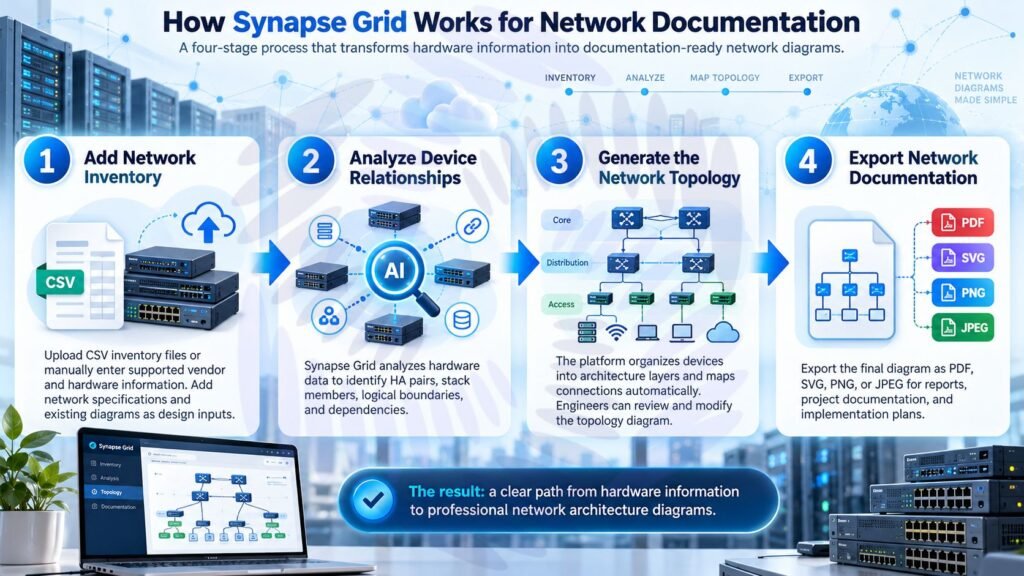
Once the relationships are identified, Synapse Grid generates an organized network topology.
Devices are placed within the appropriate architecture layers, and connections are mapped automatically.
Engineers can review and modify the resulting network diagram as needed.
Step 4: Export Network Documentation
After reviewing the topology, users can export the diagram in PDF, SVG, PNG, or JPEG format.
These files can be added to network design reports, project documentation, and implementation plans.
The result is a clearer process for moving from hardware information to professional network architecture diagrams.
Manual Network Documentation vs Synapse Grid
Traditional diagram creation often requires engineers to arrange devices, draw connections, and organize network layers themselves.
Synapse Grid uses AI-assisted automation to reduce several of these manual tasks.
| Feature | Manual Documentation | Synapse Grid |
| Diagram Creation | Devices and links drawn individually | AI-assisted topology generation |
| Device Placement | Arranged manually | Automatic hierarchy and placement |
| Connection Mapping | Connections added manually | Automated relationship mapping |
| HA and Redundancy | Identified and drawn manually | Logic-aware HA and redundancy mapping |
| Topology Changes | Diagram manually rearranged | Dynamic layout recalculation |
| Multi-Vendor Architecture | Vendor roles organized manually | Multi-vendor hardware fingerprinting |
| Large Network Diagrams | Increasing manual layout effort | Supports thousands of topology nodes |
| Diagram Export | Depends on drawing tool | PDF, SVG, PNG, and JPEG |
Synapse Grid is especially useful when teams need to create structured, topology-focused documentation from existing hardware information.
Benefits of Using Synapse Grid for Network Documentation
Save Engineering Time
Manually creating detailed network diagrams can take significant effort.
Synapse Grid reduces repetitive work by automatically arranging devices, mapping connections, and identifying architectural relationships.
Engineers can spend more time reviewing network designs instead of drawing diagrams from scratch.
Improve Network Architecture Visibility
A network inventory alone does not explain how the infrastructure works.
Synapse Grid presents devices, layers, connections, and dependencies in an organized visual layout.
This makes complex architecture easier to review and discuss.
Simplify Multi-Site Documentation
Large businesses may operate networks across multiple offices, branches, or data centers.
Synapse Grid supports distributed topologies and provides global node search to help engineers locate specific devices within complex diagrams.
Support Network Design Changes
When organizations plan to add new network equipment, it is important to understand how the new devices fit into the existing architecture.
Synapse Grid allows engineers to modify topology elements and recalculate the visual layout.
This supports clearer design reviews before network implementation.
Create Professional Documentation Outputs
Network design documents are useful for technical handovers, project discussions, and implementation planning.
Synapse Grid allows engineers to export organized architecture diagrams that can be included in these documents.
Who Can Use Synapse Grid?
Synapse Grid is designed for teams working with network design, architecture, and infrastructure documentation.
| User Type | How Synapse Grid Helps |
| Network Engineers | Creates structured diagrams and device connection maps |
| IT Infrastructure Teams | Improves visibility of network architecture |
| Network Architects | Supports design planning and architecture reviews |
| Data Center Teams | Visualizes complex infrastructure and redundant paths |
| System Integrators | Helps prepare customer network designs and technical documents |
| Enterprise IT Teams | Organizes large, multi-vendor network topologies |
Whether a team is planning a new network or improving existing topology documentation, Synapse Grid provides a more structured way to work with network architecture.
Best Practices for Using Network Documentation Software
Even with automation, network documentation works best when engineers follow a consistent process.
Here are five useful practices:
- Start with accurate hardware information. Use reliable device inventories and network specifications as the foundation for the diagram.
- Organize devices by network layer. Keep the WAN, Edge, Core, Distribution, and Access layers clearly separated.
- Show important network dependencies. Include critical device relationships, redundant links, and high-availability structures.
- Review documentation after changes. Check topology diagrams whenever important network architecture information changes.
- Export and share updated designs. Use the appropriate file formats to keep architecture reviews and project documentation consistent.
Synapse Grid supports many of these practices through its automated topology generation, logical hierarchy, and documentation export capabilities.
FAQ’s
Yes. Synapse Grid supports multi-vendor network architecture, including hardware from Cisco, Fortinet, HPE Aruba, and Huawei.
Synapse Grid is designed to handle enterprise-scale topologies containing thousands of nodes. It also provides global node search to help users navigate large, distributed network diagrams.
Synapse Grid supports PDF, SVG, PNG, and JPEG exports. These formats are useful for reports, presentations, and high-level or low-level network design documents.
Yes. Synapse Grid supports dynamic topology recalculation when nodes, links, or supported inventory and configuration information change. Its focus is network design and topology documentation rather than serving as a general network monitoring platform.
Yes. Synapse Grid is designed for network engineers, architects, system integrators, and enterprise IT teams that need structured network topology diagrams and documentation-ready outputs.
Conclusion
Accurate network documentation helps businesses understand their infrastructure, plan changes, and maintain clear technical records.
Traditional documentation methods can become time-consuming as networks grow and device relationships become more complex.
Synapse Grid by CogniKor provides an AI-powered approach to network topology documentation.
With automated diagram generation, intelligent connection mapping, multi-vendor support, dynamic layouts, and flexible export options, Synapse Grid helps engineers turn hardware information into clear network architecture.
For organizations looking to simplify topology-focused network documentation, Synapse Grid provides a practical way to reduce manual diagramming and improve architecture visibility.