

Use a network topology generator to automate enterprise network design, map device relationships, and create clear diagrams faster with Synapse Grid.
Introduction
A network topology generator helps network teams turn complex infrastructure information into a visual architecture. Instead of placing every router, switch, firewall, and connection manually, modern tools can automate much of the topology creation process.
However, generating a simple diagram is not enough for a large enterprise network. Network engineers also need accurate device roles, logical relationships, redundancy, network layers, connections, and documentation that can stay useful as infrastructure changes.
Why Modern Network Topology Generation Needs More Than Simple Diagrams
Many topology generators are designed to create basic star, ring, bus, mesh, or educational network diagrams. These tools are useful for learning and visualization, but enterprise networks often contain hundreds or thousands of devices with more complicated relationships.
A modern network topology generator should understand the network behind the icons. It should help organize hardware, identify important relationships, structure network layers, and create an architecture that engineers can actually use for planning and documentation.
The Problem With Manual Network Topology Design
Network engineers often start with spreadsheets, hardware inventories, old diagrams, and technical notes. Turning all of this information into an accurate architecture manually can require many repetitive design decisions.
Common problems include:
- ❌ Manually placing and organizing large numbers of network devices.
- ❌ Missing high-availability, stack, or redundancy relationships.
- ❌ Creating messy connection lines that make diagrams difficult to read.
- ❌ Reworking documentation whenever hardware or architecture changes.
The cost is not limited to drawing time. Outdated or unclear diagrams can slow troubleshooting, delay deployment planning, create communication problems between teams, and make infrastructure reviews more difficult.
A Smarter Solution: Automated Network Topology Generation
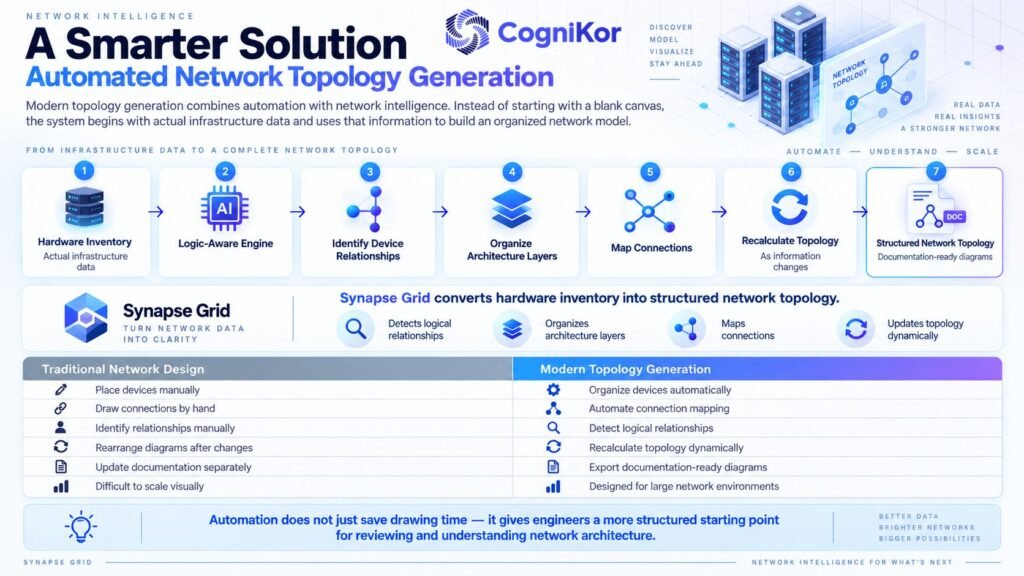
Modern topology generation combines automation with network intelligence. Instead of starting with a blank canvas, the system can begin with actual infrastructure data and use that information to build an organized network model.
Synapse Grid takes hardware inventory and converts it into structured network topology. Its logic-aware engine can identify device relationships, organize architecture layers, map connections, and recalculate topology as information changes.
| Traditional Network Design | Modern Topology Generation |
| Place devices manually | Organize devices automatically |
| Draw connections by hand | Automate connection mapping |
| Identify relationships manually | Detect logical relationships |
| Rearrange diagrams after changes | Recalculate topology dynamically |
| Update documentation separately | Export documentation-ready diagrams |
| Difficult to scale visually | Designed for large network environments |
The main advantage is context. Automation does not simply save drawing time; it gives engineers a more structured starting point for reviewing and understanding the network architecture.
Why Synapse Grid Stands Out as a Network Topology Generator
Synapse Grid is designed around enterprise network architecture rather than basic diagram drawing. It converts hardware information into a network topology while maintaining architectural context between devices and layers.
Four important capabilities include:
- Logic-aware discovery: identifies HA links, redundancy paths, stacks, and logical dependencies.
- Multi-vendor fingerprinting: assigns appropriate device roles, icons, and layer positions from hardware information.
- Dynamic hierarchy: organizes nodes into WAN, Edge, Core, Distribution, and Access layers.
- Dynamic topology updates: recalculates network structure when nodes, links, inventory, or configurations change.
Consider an enterprise with routers, firewalls, core switches, distribution switches, and access equipment from several manufacturers. Instead of manually determining where every device belongs, Synapse Grid can analyze the inventory and create a structured architecture for engineering review.
How Synapse Grid Works
Synapse Grid follows a workflow that moves from raw network inventory to an organized architecture. The process is designed to reduce manual diagram construction while keeping network relationships visible.
Step 1: Add the Network Inventory
The process begins with hardware information. Synapse Grid supports CSV-based inventory input as well as manually entered vendor and device information.
This gives the platform the devices it needs to analyze before the topology is created.
Step 2: Correlate Devices and Relationships
The system analyzes the inventory to identify relationships such as HA pairs, stack members, logical dependencies, and architectural boundaries.
It can also identify device roles and determine where equipment belongs within layers such as WAN, Edge, Core, Distribution, and Access.
Step 3: Generate and Export the Topology
Synapse Grid synthesizes the collected information into a structured topology. It maps connections automatically, while Smart Cable Snapping helps keep links connected to relevant logical points.
You can export the finished architecture to PDF, SVG, PNG, and JPEG for network planning, HLD/LLD documentation, technical reviews, and implementation work.
Synapse Grid vs Other Network Topology Generators
Different network topology generators solve very different problems. Some are built for students, some generate predefined graph structures, some create diagrams from prompts, and others were created primarily for research or network simulation.
The table below shows where Synapse Grid differs from several pages currently appearing for the keyword.
| Tool | Primary Focus | Enterprise Hardware Logic | Dynamic Relationships | Pricing/Access | Support Position |
| Synapse Grid | Enterprise network architecture | Yes | Yes | Public pricing not listed | CogniKor contact |
| GenerateRandom | Star/ring/mesh topology generation | No | No | Free web tool | Website contact |
| Science Diagram | Educational labeled diagrams | Limited | No | Free online generator | Community/web |
| Figviz | AI prompt-to-diagram generation | Prompt-based | Not positioned as inventory correlation | Free starter access; paid options available | Docs/contact |
| IGen | Research topology heuristics | Research-focused | Algorithmic generation | Open-source LGPL | Legacy project resources |
| ns-3 Generator | Simulation topology + C++ output | Simulation-focused | No enterprise inventory workflow | Open-source GPL | Repository archived |
GenerateRandom itself notes that its generated structures are idealized and do not represent bandwidth, latency, failure behavior, or the complexity of real hybrid networks.
IGen focuses on network-design heuristics, while the ns-3 generator is intended for simulation and has been archived.
Synapse Grid therefore serves a different use case. It is intended for teams that need to understand how real infrastructure devices fit together rather than simply generate an illustrative graph or simulation topology.
Benefits of Using an Automated Network Topology Generator
Automation becomes especially valuable as the number of devices, sites, vendors, and network relationships increases. A structured topology gives engineering teams a clearer view of infrastructure without requiring every visual element to be created from scratch.
Save Engineering Time
Manual topology creation involves repeated device placement, connection drawing, formatting, and diagram cleanup. Automating those tasks allows engineers to spend more time reviewing architecture and less time maintaining shapes and lines.
Reduce Rework
Infrastructure rarely stays unchanged. New switches are added, devices are replaced, links move, and sites expand.
Synapse Grid can recalculate topology as network information changes, reducing the need to rebuild a diagram manually whenever infrastructure is updated.
Improve Diagram Quality and Clarity
Large diagrams can quickly become difficult to understand when connections overlap and devices are positioned without hierarchy.
Features such as dynamic hierarchy, HA boundaries, telemetry overlays, Smart Cable Snapping, and global node search help organize large network architectures more clearly.
Improve Collaboration and Documentation
A topology becomes more valuable when network engineers, project managers, implementation teams, and other stakeholders can understand the same architecture.
Synapse Grid supports documentation-ready exports, making the generated topology useful for technical planning, design reviews, HLD/LLD documentation, implementation discussions, and future upgrades.
Build Your Network Topology With Synapse Grid
Enterprise topology generation should do more than place network icons on a canvas. Synapse Grid combines hardware information, network logic, automated correlation, structured layout, and dynamic topology generation in one workflow.
Get started with Synapse Grid today — explore the platform and contact CogniKor to discuss your network design requirements.
For teams maintaining complex or growing infrastructure, moving from manual diagramming to logic-aware topology generation can make network planning and documentation easier to manage.
FAQ’s
A network topology generator is software that helps create a visual representation of network devices and their connections. Advanced platforms can also organize device roles, network layers, logical relationships, and redundancy.
Start by collecting accurate hardware and device information. With Synapse Grid, network inventory can be added to the platform, analyzed for relationships, organized into logical layers, and synthesized into a structured topology.
It can reduce repetitive engineering work associated with placing devices, drawing connections, reorganizing diagrams, and recreating documentation. The actual financial return will depend on the size, complexity, and workflow of each organization.
Synapse Grid includes multi-vendor fingerprinting designed to identify hardware capabilities and assign device roles, icons, and layer positions. CogniKor also positions the platform for enterprise environments using multiple network vendors.
Yes. Synapse Grid supports exports including PDF, SVG, PNG, and JPEG. These formats can be used for technical documentation, presentations, architecture reviews, and network planning.
Conclusion
A basic network topology generator can quickly visualize devices and connections, but enterprise architecture requires deeper context. HA relationships, redundant paths, network layers, device roles, multi-vendor hardware, and changing infrastructure all need to be considered.
Synapse Grid turns hardware inventory into a structured network architecture and uses logic-aware automation to help organize devices and their relationships. It also produces documentation-ready diagrams that can support the network throughout planning and implementation.
Instead of spending engineering time repeatedly drawing and reorganizing network diagrams, teams can build from an automatically generated architecture and focus their attention on reviewing, improving, and deploying the network.