
Boost network planning efficiency with AI Network Design Software that automates topology creation, maps connections, reduces manual work, and improves design accuracy.
Introduction
Modern enterprise networks are becoming larger and more difficult to manage. A network may include routers, switches, firewalls, access points, WAN connections, management links, and hardware from several different vendors.
Designing all these components manually can take a significant amount of engineering time. AI network design software helps simplify this process by using artificial intelligence and automation to turn network information into organized, easier-to-understand network architectures.
What Is AI Network Design Software?
AI network design software is a technology that helps network engineers plan, organize, and visualize network infrastructure with less manual work. Instead of manually placing every device and drawing every connection, AI can analyze network information and help create a structured topology.
The software can study hardware data, device roles, network relationships, and infrastructure requirements. It can then use this information to help engineers understand where devices belong and how different parts of the network should connect.
This becomes particularly useful in enterprise environments where hundreds or even thousands of devices may exist across multiple sites.
Why Is AI Important in Modern Network Design?
Traditional network design often requires engineers to work with spreadsheets, hardware inventories, old diagrams, and technical documents. They must identify devices, organize network layers, find redundancy requirements, map connections, and prepare final documentation.
As infrastructure grows, this manual process becomes harder to maintain. One small network change may require engineers to update multiple connections and reorganize part of the topology.
AI can reduce this repetitive work by analyzing infrastructure information and identifying patterns automatically. Engineers can then spend more time reviewing architecture and making technical decisions instead of repeatedly drawing and arranging network diagrams.
How AI Network Design Software Works
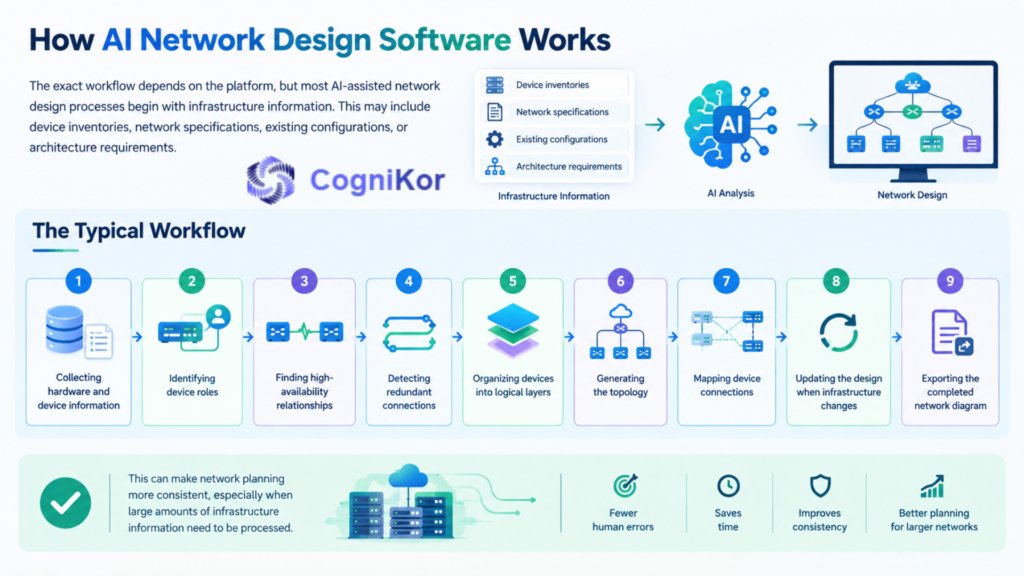
The exact workflow depends on the platform, but most AI-assisted network design processes begin with infrastructure information. This may include device inventories, network specifications, existing configurations, or architecture requirements.
The software analyzes this information to understand the network environment. It can then help identify device roles, relationships, dependencies, network layers, and connection requirements.
A typical workflow may include:
- Collecting hardware and device information
- Identifying device roles
- Finding high-availability relationships
- Detecting redundant connections
- Organizing devices into logical layers
- Generating the topology
- Mapping device connections
- Updating the design when infrastructure changes
- Exporting the completed network diagram
This can make network planning more consistent, especially when large amounts of infrastructure information need to be processed.
Synapse Grid: AI-Powered Network Design Software
Synapse Grid by CogniKor is an AI-powered network design and topology platform that transforms hardware information into structured network architecture. It takes network specifications, device information, inventory data, and other infrastructure inputs and uses them to build organized network designs.
Instead of treating the network as a collection of unrelated devices, Synapse Grid focuses on the relationships between those devices. Its logic-aware system can identify high-availability links, redundancy paths, logical dependencies, and other architectural relationships.
This gives engineers more context than a basic diagram containing boxes and connection lines.
Turn Hardware Inventory into Network Architecture
A hardware inventory can contain hundreds of device names, models, quantities, and technical details. Reading a spreadsheet alone does not provide a clear picture of how those devices should work together.
Synapse Grid uses inventory information as the foundation for the design process. Users can provide inventory through CSV data or work with vendor and device information inside the platform.
The system then analyzes the information and creates a more visual and structured representation of the infrastructure.
This helps transform raw hardware information into an architecture that network teams can review more easily.
Automatically Organize Network Layers
A well-designed enterprise network normally contains different architectural layers. Devices may belong to WAN, Edge, Core, Distribution, or Access sections depending on their purpose.
Manually deciding the correct position for every device becomes difficult when the topology contains a large number of nodes.
Synapse Grid can automatically organize nodes into these network layers. It also uses hardware capabilities to help assign device roles, icons, and appropriate positioning within the architecture.
The result is a network design with more structure and context instead of devices being placed randomly across a diagram.
Understand HA, Redundancy, and Device Relationships
Network reliability often depends on devices working together. Two switches may operate as a stack, firewalls may work as a high-availability pair, and important network paths may require redundant connections.
These relationships need to be represented correctly in the network architecture.
Synapse Grid’s correlation process can identify HA pairs, stack members, logical boundaries, and related dependencies. It can also visually organize high-availability groups so engineers can quickly understand how critical devices work together.
This logic-aware approach makes the topology more useful for both planning and infrastructure documentation.
Support Multi-Vendor Network Environments
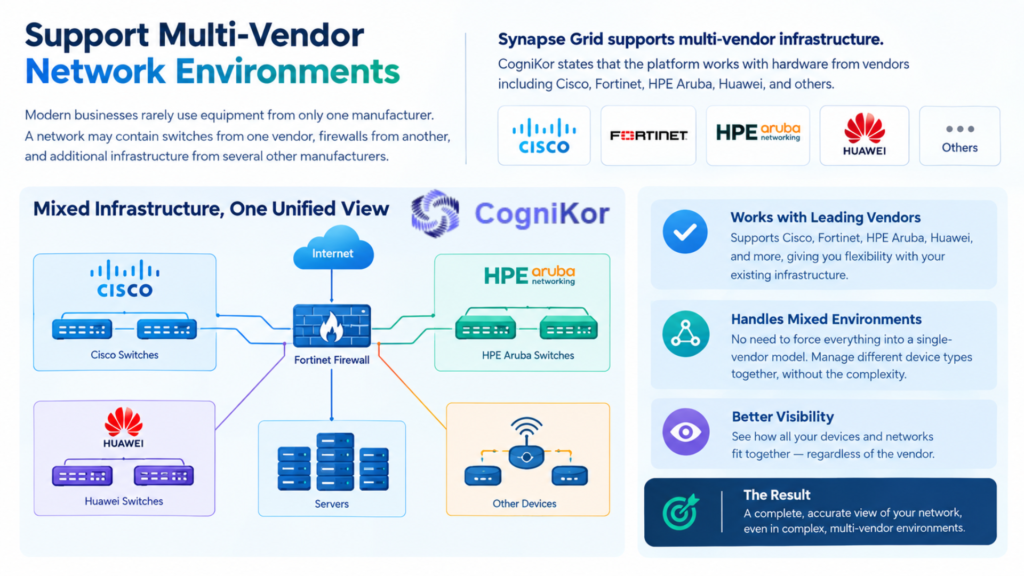
Modern businesses rarely use equipment from only one manufacturer. A network may contain switches from one vendor, firewalls from another, and additional infrastructure from several other manufacturers.
Synapse Grid is designed to support multi-vendor infrastructure. CogniKor states that the platform works with hardware from vendors including Cisco, Fortinet, HPE Aruba, Huawei, and others.
This makes the platform useful for organizations with mixed infrastructure, where manually organizing different device types can become complicated.
Instead of forcing the entire architecture into a single-vendor model, engineers can create a broader view of how their existing infrastructure fits together.
Keep Network Designs Updated as Infrastructure Changes
Network environments do not remain the same forever. Businesses replace switches, add new devices, expand offices, introduce additional links, or redesign parts of their infrastructure.
A static diagram can quickly become outdated when these changes happen.
Synapse Grid uses dynamic topology capabilities that can recalculate paths and reorganize the architecture when nodes or connections change. Its real-time vector ingestion also helps the topology respond when inventory or configuration information changes.
This reduces the need to rebuild large sections of a network diagram every time the infrastructure is modified.
Create Documentation-Ready Network Diagrams
Network architecture diagrams are required for more than initial planning. They may be used for technical reviews, implementation planning, High-Level Design documents, Low-Level Design documents, upgrades, and internal IT documentation.
Synapse Grid allows completed architecture diagrams to be exported into formats including PDF, SVG, PNG, and JPEG. CogniKor specifically positions its PDF and SVG exports for HLD and LLD documentation.
This helps teams move from network planning to documentation without recreating the same architecture in a separate diagramming tool.
Traditional Network Design vs. Synapse Grid
| Traditional Approach | Synapse Grid Approach |
| Devices arranged manually | AI-assisted device organization |
| Relationships identified manually | Logic-aware relationship discovery |
| Network layers organized by engineers | Automatic network hierarchy |
| Connections drawn manually | Automated connection mapping |
| Changes require diagram rework | Dynamic topology recalculation |
| Mixed vendors require extra organization | Multi-vendor hardware support |
| Documentation prepared separately | Export-ready architecture diagrams |
The purpose of AI is not to remove the network engineer from the design process. Instead, it can automate repetitive parts of network planning so engineers can focus on validating architecture, reviewing risks, and making better infrastructure decisions.
Build Smarter Networks with Synapse Grid
As enterprise infrastructure becomes larger, manually designing every connection and organizing every network device can consume valuable engineering time.
AI network design software gives network teams a smarter way to convert complex infrastructure information into understandable network architecture.
Synapse Grid brings this approach into enterprise network design by combining hardware-aware analysis, topology automation, multi-vendor support, HA relationship discovery, logical network hierarchy, dynamic updates, and documentation-ready exports.
For organizations dealing with complex or growing infrastructure, this can provide a clearer path from raw hardware information to an organized network design.
Instead of spending most of the project manually arranging diagrams, network teams can use Synapse Grid to automate more of the design process and focus their expertise where it matters most.
FAQ’s
Can AI network design software support multi-vendor devices?
Some platforms support devices from multiple vendors, which is useful for businesses with mixed infrastructure. For example, a network may include hardware from Cisco, Fortinet, Huawei, HPE Aruba, and other manufacturers.
How does AI improve network design accuracy?
AI can help identify device roles, dependencies, high-availability relationships, and network layers based on available infrastructure data. This reduces repetitive manual tasks and can help engineers create more consistent network designs.
Can AI network design software help with network documentation?
Yes. AI-assisted network design tools can make documentation easier by creating structured topology diagrams that can be used for technical planning and network documentation. Some platforms also support export formats such as PDF, SVG, PNG, and JPEG.
Does AI network design software replace network engineers?
No. AI network design software is designed to support engineers rather than replace them. It automates repetitive tasks, while engineers still review the architecture, validate technical decisions, manage risks, and make final network design choices.
10. What should businesses look for in AI network design software?
Businesses should look for features such as automated topology creation, multi-vendor support, device-role identification, redundancy mapping, network-layer organization, dynamic updates, and easy diagram exports. The right platform should also be simple to use and suitable for the size and complexity of the network.
Conclusion
AI network design software gives network teams a more efficient way to plan and visualize modern infrastructure. By automating repetitive tasks such as device organization, topology creation, connection mapping, and relationship discovery, it can reduce manual effort and make complex networks easier to understand.
For businesses managing growing or multi-vendor environments, AI-assisted network design can improve both planning speed and documentation quality. Platforms such as Synapse Grid add further value by combining topology automation, hardware-aware analysis, high-availability mapping, logical network organization, and export-ready diagrams in one workflow.
As networks continue to grow in size and complexity, using AI network design software can help engineering teams work faster, maintain clearer documentation, and focus more attention on architecture, reliability, and better network decisions.