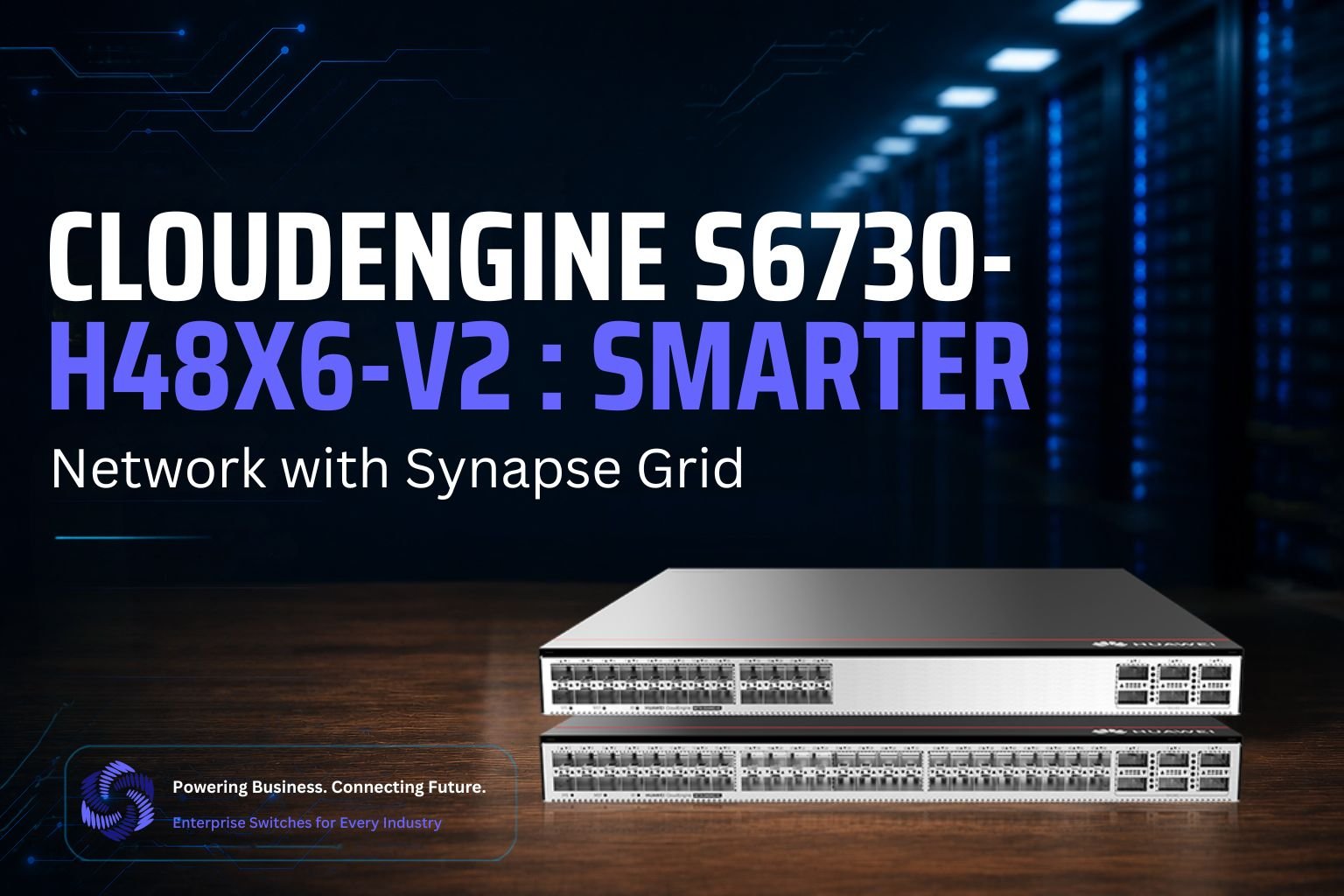
Discover the CloudEngine S6730-H48X6-V2, a high-performance enterprise switch designed for fast, reliable, and scalable network connectivity in modern campus and data center environments.
Introduction
Modern networks carry a huge amount of data every second. Offices, schools, data centers, cloud systems, and large businesses all need fast switches to keep this data moving.
The CloudEngine S6730-H48X6-V2 is built for this type of high-speed networking. It gives businesses many fast ports and powerful uplink options.
But choosing a good switch is only the first step. Someone still needs to decide where the switch belongs, what should connect to it, which links need backup paths, and how the whole network should be arranged.
Doing all this by hand can take a lot of engineering time. Synapse Grid uses AI to automate this design work. It takes hardware information and turns it into a structured network design that engineers can review before installation starts.
CloudEngine S6730-H48X6-V2 Features and Specifications
The CloudEngine S6730-H48X6-V2 belongs to Huawei’s CloudEngine S6730-H-V2 family of enterprise switches.
Huawei’s official 48-port H48X6C-V2 model provides 48 x 10GE SFP+ ports and 6 x 40/100GE QSFP28 ports. It also offers 490 Mpps forwarding performance and switching capacity listed at 2.16/2.4 Tbit/s.
The switch provides:
- 48 high-speed 10GE connections
- 6 high-capacity 40GE/100GE uplink ports
- Fast packet forwarding
- High switching capacity
- VXLAN support
- Flexible enterprise networking
- Options for high-speed network growth
- Dual pluggable power modules with 1+1 backup support
This makes it useful when many devices need fast access to the network. Think of the switch as a large road junction. Many roads can connect to it, but those roads still need to be planned correctly. That is why network design matters just as much as switch performance.
CloudEngine S6730-H48X6-V2 Performance and Network Capabilities
Large businesses may have hundreds or thousands of devices sending data at the same time.
A switch must be able to handle this traffic without becoming a weak point. The CloudEngine S6730-H48X6-V2 family is designed for high-speed enterprise environments. Its 10GE ports can connect high-bandwidth devices, while its faster uplinks can carry larger amounts of traffic between important parts of the network.
Huawei also supports VXLAN in the S6730-H-V2 family. This allows organizations to create virtual networks over their physical infrastructure.
This makes the switch suitable for situations where businesses need:
- High network capacity
- Fast connections between network layers
- Flexible network architecture
- Reliable enterprise connectivity
- Support for future expansion
- Virtualized network environments
The hardware can handle demanding jobs. The next challenge is designing the network around it.
CloudEngine S6730-H48X6-V2 Deployment and Use Cases
The CloudEngine S6730-H48X6-V2 can be useful in different enterprise environments.
These may include:
- Large corporate offices
- Campus networks
- Universities
- Enterprise aggregation networks
- High-bandwidth environments
- Networks with many access switches
- Growing business infrastructure
For example, imagine a company buying 10 CloudEngine S6730-H48X6-V2 switches.
Buying them is easy.
The network team must decide where all 10 switches will sit, what other devices they will connect to, where high-speed links are required, and how backup connections should work.
If routers, firewalls, WAN equipment, and switches from other brands are also involved, the design becomes even more complex. This is exactly the type of work Synapse Grid is designed to simplify.
What Does Synapse Grid Actually Do?
Synapse Grid is an AI-powered network design and topology platform.
Its job is to take raw network information and turn it into a useful network architecture.
Instead of asking an engineer to manually draw every switch, firewall, router, connection, and network layer, Synapse Grid automates much of this process.
It can start with information such as:
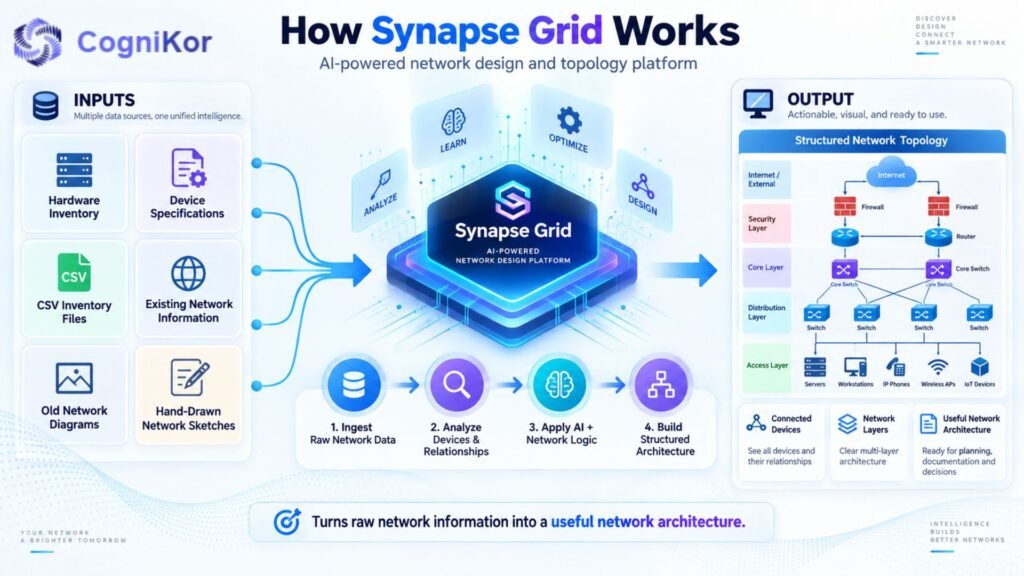
- Hardware inventory
- Device specifications
- CSV inventory files
- Existing network information
- Old network diagrams
- Even hand-drawn network sketches
It then uses AI and network logic to understand how these pieces may fit together.
The result is not simply a list of hardware.
The goal is to create a structured topology showing how the network is organized and connected.
Step 1: Give Synapse Grid Your Network Inventory
The first step is telling Synapse Grid what hardware exists in the project.
A user can upload inventory information through CSV or enter vendor/device counts manually.
For example, imagine your project contains:
- 8 CloudEngine S6730-H48X6-V2 switches
- 2 firewalls
- 4 routers
- 20 access switches
- WAN equipment
- Management connections
Normally, an engineer would first need to study this list and manually begin arranging devices.
Synapse Grid uses the inventory as the starting data for its AI engine.
Now the system knows what hardware it needs to work with.
Step 2: AI Studies the Hardware
After receiving the inventory, Synapse Grid does more than simply place device names on a screen.
It analyzes hardware capabilities.
This helps the system understand what kind of device it is working with and what role that hardware may have inside the network.
For example, a CloudEngine S6730-H48X6-V2 has high-density 10GE connectivity and high-speed uplinks.
Those capabilities matter when deciding how that device fits into a larger network.
Synapse Grid can use hardware-aware information to assign appropriate:
- Device roles
- Device icons
- Network positions
- Architecture layers
This saves engineers from manually classifying every device before they can begin designing.
Step 3: AI Finds Relationships Between Devices
Knowing which devices exist is not enough. The system also needs to understand how devices relate to each other.
This is where Synapse Grid’s correlation process comes in. Its AI engine can identify important relationships such as:
- High-availability pairs
- Stack members
- Logical boundaries
- Device dependencies
- Redundancy relationships
For example, two devices may work together to provide high availability.
Instead of showing them as two unrelated boxes, Synapse Grid can recognize that relationship and represent it as part of the architecture.
This gives the network diagram more meaning.
It does not only answer:
“What devices do we have?”
It helps answer:
“How do these devices work together?”
Step 4: Devices Are Sorted into Network Layers
Large networks are easier to understand when devices are organized by their jobs.
Synapse Grid can automatically arrange nodes into network layers such as:
- WAN
- Edge
- Core
- Distribution
- Access
Imagine having 100 devices on one page with no organization.
It would be difficult to understand.
Now imagine those devices automatically grouped according to their role.
The design becomes much easier to read.
For a project using CloudEngine S6730-H48X6-V2 switches, this helps the engineer see where those switches sit in relation to routers, firewalls, access equipment, and other infrastructure.
Step 5: Synapse Grid Builds the Network Topology
Once Synapse Grid understands the devices and their relationships, it can generate the network topology.
A topology is simply a visual map of the network.
It shows things such as:
- Devices
- Network layers
- Connections
- Device relationships
- High-availability groups
- Network paths
This is where automation saves a large amount of manual work.
Instead of an engineer opening a blank design and dragging every device into position, Synapse Grid creates a structured starting architecture automatically.
The engineer can then review the design and make decisions based on a much clearer picture.
Step 6: Smart Cable Mapping Makes Connections Clear
A network diagram can become messy very quickly. Imagine 50 switches with lines running in every direction. Soon, the drawing may look like a bowl of spaghetti.
Synapse Grid uses Smart Cable Snapping to make connection mapping cleaner.
Links can snap to relevant logical connection points instead of being placed randomly around devices.
The platform can also visually separate different types of links, including:
- 100G fiber
- MPLS
- Copper
- Management links
This can be particularly useful with a switch such as the CloudEngine S6730-H48X6-V2 because it supports different high-speed connections.
The engineer gets a clearer picture of how important links are arranged before the physical cabling work begins.
Step 7: Synapse Grid Checks the Design Before Installation
This is one of the most useful parts of the process.
Synapse Grid is designed to help check network and cabling logic before the physical network is built.
Why does this matter?
Because fixing a problem on a digital design is much easier than fixing it after equipment has been installed.
Before deployment, engineers can review questions such as:
- Are devices in the correct place?
- Are important relationships represented?
- Are HA devices grouped correctly?
- Are network layers logical?
- Are links mapped clearly?
- Does the design make sense before installation begins?
This creates an extra planning stage between buying the hardware and connecting the cables.
Step 8: Change a Device and the Design Can Adapt
Networks change all the time.
Suppose the original project has eight CloudEngine switches.
Later, the company decides it needs ten.
On a traditional static diagram, an engineer may have to add new icons, move existing devices, redraw lines, and reorganize the page.
Synapse Grid uses a dynamic topology model.
When nodes, links, inventory, or configurations change, the system can recalculate and reorganize the layout.
This means the design is not just a fixed picture.
It can respond as the network changes.
That becomes very useful for growing businesses and multi-site networks.
Step 9: Use Ready-Made Architecture Baselines
Not every network needs to begin with an empty page.
Synapse Grid supports project baselines that can provide a starting structure for common network architectures.
For example, a team working on a data center can start with a Data Center Spine-Leaf type
of baseline.
This gives engineers a starting framework instead of making them build every part of the architecture manually.
AI and automation can then work with the actual hardware inventory to develop the design further.
This can make early network planning much faster.
Step 10: Find Any Device in a Large Network
A small diagram may contain 10 or 20 devices. An enterprise network may contain thousands.
Finding one particular switch inside such a large architecture could become difficult.
Synapse Grid includes global node search so users can locate devices across large and multi-site topologies.
For example, an engineer could locate a particular switch without manually searching through every part of the architecture.
This becomes increasingly useful as the network grows.
Step 11: Export the Finished Network 5 Design
Once the design is ready, it needs to leave the design workspace.
Engineers, installation teams, managers, and clients may all need access to it.
Synapse Grid can export architecture designs in formats such as:
- SVG
- PNG
- JPEG
PDF and SVG outputs can also support HLD and LLD documentation workflows.
This means the work created during planning can become useful project documentation instead of disappearing after installation.
How Synapse Grid Works from Start to Finish?
Here is the complete process in simple terms:
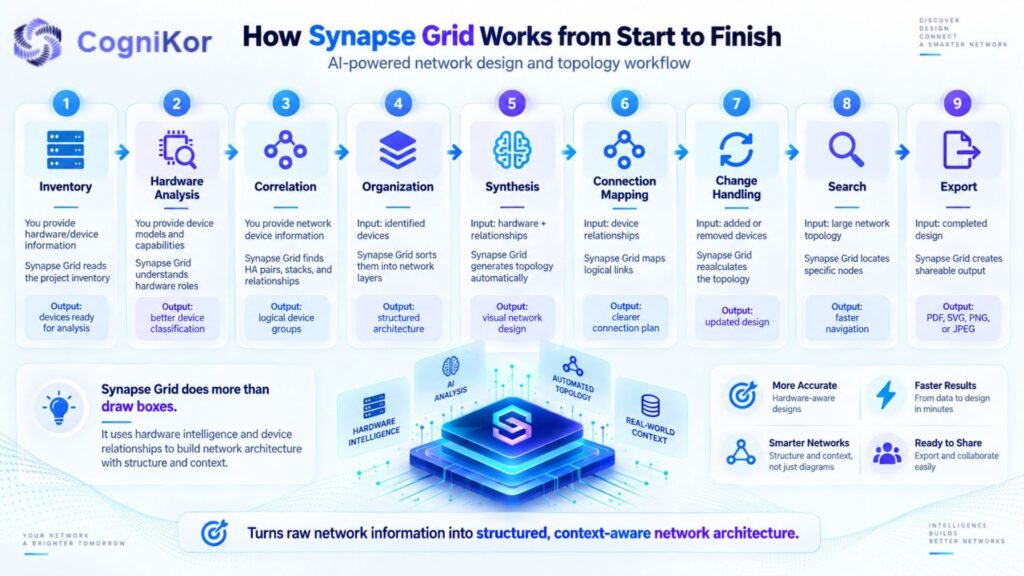
| Stage | What You Provide | What Synapse Grid Does | What You Get |
| Inventory | Hardware/device information | Reads the project inventory | List of devices ready for analysis |
| Hardware Analysis | Device models and capabilities | Understands hardware roles | Better device classification |
| Correlation | Network device information | Finds HA pairs, stacks and relationships | Logical device groups |
| Organization | Identified devices | Sorts them into network layers | Structured architecture |
| Synthesis | Hardware + relationships | Generates topology automatically | Visual network design |
| Connection Mapping | Device relationships | Maps logical links | Clearer connection plan |
| Change Handling | Added/removed devices | Recalculates the topology | Updated design |
| Search | Large network topology | Locates specific nodes | Faster navigation |
| Export | Completed design | Creates shareable output | PDF, SVG, PNG or JPEG |
The important point is that Synapse Grid does not simply draw boxes.
It uses information about the hardware and relationships to help build a network architecture that has structure and context.
Example: Planning CloudEngine S6730-H48X6-V2 with Synapse Grid
Imagine an enterprise wants to upgrade its network.
It has:
- 12 CloudEngine S6730-H48X6-V2 switches
- 2 edge routers
- 2 firewalls
- 30 access switches
- Multiple WAN connections
- Management links
- Redundant devices
Without Synapse Grid
The engineering team may need to:
- Read the inventory.
- Identify every device.
- Decide where devices belong.
- Find HA pairs.
- Draw all devices.
- Arrange them into layers.
- Map connections.
- Clean up crossing lines.
- Review the architecture.
- Prepare the final diagram.
Every network change may create more manual work.
With Synapse Grid
The team provides the inventory.
Synapse Grid then helps:
- Understand the hardware.
- Identify device roles.
- Detect important relationships.
- Organize network layers.
- Generate the topology.
- Map connections.
- Keep the layout structured.
- Recalculate the design when things change.
- Produce documentation-ready output.
The network engineer still reviews and controls the final architecture. AI handles much of the repetitive design work around it.
Why This Matters Before Installing CloudEngine Switches
A CloudEngine S6730-H48X6-V2 is powerful hardware, but the switch cannot decide the complete architecture around itself.
That is the difference between network hardware and network design.
The switch moves network traffic.
Synapse Grid helps engineers plan how that switch fits into the wider infrastructure.
This can help teams:
- Start projects faster
- Reduce repetitive diagram work
- Understand large hardware inventories
- Identify important device relationships
- Keep complex topologies organized
- Prepare connections before installation
- Adapt designs when hardware changes
- Create clearer documentation
- Work with Huawei and other vendors in one design
Synapse Grid supports hardware from Huawei as well as vendors such as Cisco, Fortinet, and HPE Aruba, making it useful when the CloudEngine switch is only one part of a mixed-vendor network.
FAQ’s
Yes. The CloudEngine S6730-H-V2 series supports VXLAN-based network virtualization, helping organizations create flexible virtual networks and support multiple services over a shared physical infrastructure.
It can be used in enterprise campus networks, aggregation networks, data-intensive environments, education networks, government organizations, and other infrastructures that require high-density 10GE connectivity.
Yes. The corresponding S6730-H48X6C-V2 supports dual pluggable power modules with 1+1 power backup, helping improve network availability if one power module fails.
The S6730-H-V2 series supports telemetry-based data collection and can work with Huawei network management and analysis solutions to help administrators identify network issues and improve operational efficiency.
The CloudEngine S6730-H48X6-V2 is suitable for organizations that need high-density 10GE access, high-speed 40GE/100GE uplinks, strong forwarding performance, network virtualization capabilities, and redundant hardware for improved reliability.
Conclusion
The CloudEngine S6730-H48X6-V2 is a powerful networking solution for organizations that require high-speed connectivity, strong performance, and reliable network operation. With high-density 10GE access, fast uplink capabilities, advanced network features, and support for modern enterprise environments, it can handle demanding traffic while helping maintain efficient and scalable infrastructure.
For businesses upgrading campus networks, aggregation layers, or other data-intensive environments, the CloudEngine S6730-H48X6-V2 offers a practical combination of performance, flexibility, and reliability. Choosing the right configuration, licensing, and deployment plan can help organizations get the best long-term value from this switch.