
Learn about CloudEngine S6730-H48X6-V2 and discover how Synapse Grid uses AI automation to simplify network design, topology planning, and documentation.
Introduction
Modern businesses depend on networks every day. Computers, Wi-Fi access points, servers, security systems, and many other devices need to communicate quickly and reliably. As a business grows, connecting and organizing all these devices becomes more difficult.
The CloudEngine S12700E Series is designed for large campus networks where high performance and reliable connectivity are important. However, having powerful switches is only one part of building a successful network. Engineers also need to decide where devices should go, how they should connect, and how the complete network should be documented.
This is where AI-powered network design can help.
What Is the CloudEngine S12700E Series?
The CloudEngine S12700E Series is a family of core switches from Huawei. A core switch can be thought of as a major traffic center inside a network. It helps large amounts of data move between different parts of the network.
These switches are mainly designed for high-end campus networks. A campus network may connect multiple floors, buildings, offices, departments, access points, and other network devices.
The series includes different models, such as:
- CloudEngine S12700E-4
- CloudEngine S12700E-8
- CloudEngine S12700E-12
The different models give organizations choices based on the size and needs of their networks.
The S12700E Series is designed to provide:
- High switching performance
- Large network capacity
- Wired and wireless network convergence
- Flexible network expansion
- Support for different types of network ports
- Centralized wireless services
- Reliable data forwarding
This makes the series suitable for organizations that need a strong core for a large network.
Key Features of CloudEngine S12700E Series Switches
The CloudEngine S12700E Series provides several capabilities for enterprise campus environments.
One important feature is large switching capacity. Depending on the model and supported hardware configuration, the series can provide switching capacity reaching 86.4 Tbit/s.
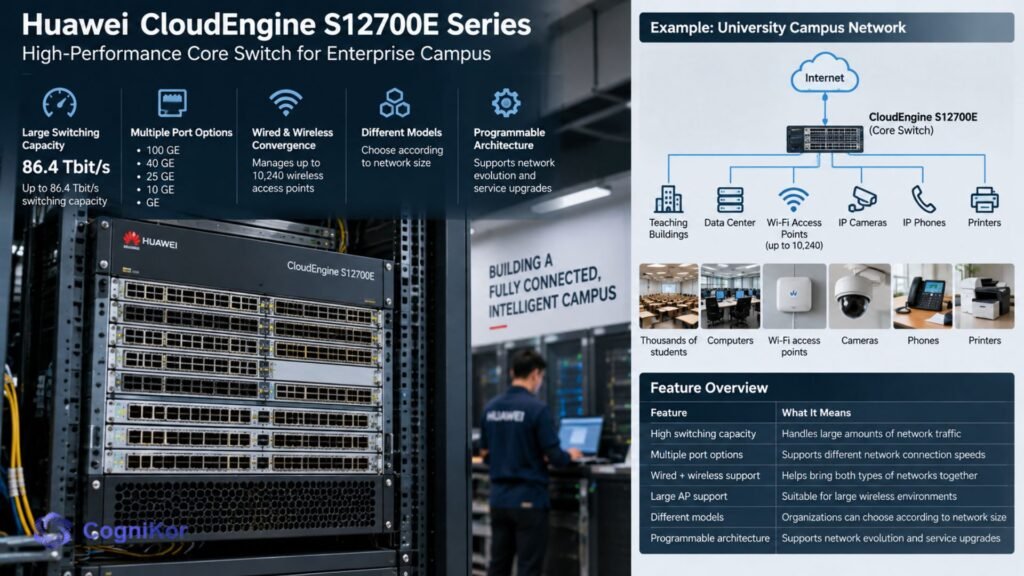
The switches also support several port types, including:
- 100 GE
- 40 GE
- 25 GE
- 10 GE
- GE
Another important capability is wired and wireless convergence. A CloudEngine S12700E can manage up to 10,240 wireless access points, helping large organizations bring wired and wireless services together.
Here is a simple overview:
| Feature | What It Means |
| High switching capacity | Handles large amounts of network traffic |
| Multiple port options | Supports different network connection speeds |
| Wired + wireless support | Helps bring both types of networks together |
| Large AP support | Suitable for large wireless environments |
| Different models | Organizations can choose according to network size |
| Programmable architecture | Supports network evolution and service upgrades |
For a simple example, imagine a large university. It may have thousands of students, computers, cameras, phones, printers, and Wi-Fi access points. A powerful core switch helps move traffic between these different parts of the network.
Why Network Design Matters with CloudEngine S12700E Series
Buying a powerful switch does not automatically create a good network.
Engineers still need to answer important questions:
- Where should the core switch be placed?
- Which devices connect to it?
- Which switches belong at the access or distribution layer?
- Which connections need redundancy?
- What type of cable or link should be used?
- How will high-availability devices work together?
- How should the final network be documented?
As the number of devices increases, answering these questions manually can become difficult.
An engineer may have spreadsheets containing hundreds of devices, old network diagrams, equipment lists, and different vendor products.
Drawing all those connections manually can consume valuable time and can also introduce human errors. This is where Synapse Grid can change the way network infrastructure is designed.
Make Network Design Smarter with Synapse Grid
Synapse Grid by CogniKor is an AI-powered platform built to turn network information into clear and structured network designs. Instead of asking an engineer to manually place every device, draw every connection, and organize every network layer, Synapse Grid uses automation to help build the topology.
This is especially useful when working with large enterprise environments containing switches, routers, firewalls, access devices, and equipment from different vendors.
The goal is simple: give the system your network information and let AI help organize the design.
How Synapse Grid Automates Network Design
Traditional network design can involve many manual steps.
An engineer may first collect an inventory, identify every device, decide which layer it belongs to, find related devices, draw connections, check redundancy, and finally prepare the documentation.
Synapse Grid helps automate much of this design workflow.
The process can be understood in four simple steps:
- Add the inventory
Provide the hardware information the network needs. - Understand relationships
AI analyzes devices and identifies important relationships, including high-availability pairs and logical connections. - Build the topology
The platform organizes devices and creates a structured network diagram. - Export the design
The completed architecture can be exported for documentation and further use.
This means teams can spend less time drawing diagrams and more time reviewing and improving the actual network.
From Hardware Inventory to a Clear Network Topology
A large network can contain hundreds or even thousands of devices.
Looking at a long spreadsheet makes it difficult to understand how everything should connect.
Synapse Grid helps turn that information into a visual network structure.
For example, the platform can organize devices into layers such as:
- WAN
- Edge
- Core
- Distribution
- Access
Imagine that a company is planning a network containing a CloudEngine S12700E core switch along with access switches and other network equipment.
Instead of manually deciding where every device should appear on a diagram, an AI-driven design workflow can help identify device roles and organize the topology. The result is easier for engineers and IT teams to understand.
Multi-Vendor Network Design Made Easier
Enterprise networks do not always use hardware from only one manufacturer.
A business may have equipment from different vendors because its infrastructure has grown over many years.
Synapse Grid is designed for multi-vendor environments and can work with hardware information involving vendors such as:
- Huawei
- Cisco
- Fortinet
- HPE Aruba
- And others
This matters when designing a network around devices such as the CloudEngine S12700E Series.
The engineer does not need every part of the network to come from the same vendor before creating a useful architecture.
AI Helps Find Important Device Relationships

Network design is more than putting icons on a page.
The connections between devices also matter.
Synapse Grid uses logic-aware analysis to help identify relationships such as:
- High-availability pairs
- Redundant network paths
- Stack members
- Logical dependencies
- Device roles
- Network-layer placement
This can make a complicated design easier to understand. For example, two important switches may be designed to provide redundancy. The diagram should clearly show that relationship instead of displaying them as two unrelated boxes.
AI-assisted correlation helps build that context into the network design.
Update Network Designs Without Starting Again
A business may add another switch, replace hardware, expand to a new location, or change its architecture.
Synapse Grid uses dynamic topology logic. When inventory or configurations change, the topology can be recalculated and reorganized.
| Traditional Manual Design | Synapse Grid Approach |
| Devices placed manually | AI helps organize devices |
| Connections drawn manually | Connection mapping is automated |
| Network layers organized by hand | Devices can be sorted into logical layers |
| Changes require diagram editing | Topology can recalculate as information changes |
| Large networks become difficult to view | Designed to handle large-scale topologies |
| Documentation requires extra work | Designs can be exported in multiple formats |
For network teams, this can make ongoing design work much easier.
Create Documentation-Ready Network Diagrams
A network diagram is useful not only during planning.
It may also be needed for:
- High-Level Design (HLD)
- Low-Level Design (LLD)
- Internal IT documentation
- Implementation planning
- Network reviews
- Technical presentations
- Future infrastructure upgrades
Synapse Grid allows network designs to be exported in formats including:
- SVG
- PNG
- JPEG
This helps teams move from network planning to professional documentation without rebuilding the same architecture again in another tool.
Why Use Synapse Grid for Modern Switch Infrastructure?
Powerful switches such as the CloudEngine S12700E Series can provide the performance needed at the center of a large campus network.
Instead of spending days manually turning inventories and technical information into diagrams, network teams can use AI to help:
- Understand hardware relationships
- Build structured topologies
- Organize network layers
- Map connections
- Identify HA relationships
- Work across multiple hardware vendors
- Update designs when infrastructure changes
- Create documentation-ready diagrams
In simple words, the switch moves the network traffic, while Synapse Grid helps engineers design and understand how the network should fit together.
Build Networks with Less Manual Work
Enterprise networks are becoming larger and more complicated. Using powerful switches is important, but manually planning every device and connection can slow projects down.
The CloudEngine S12700E Series provides the capacity and features required for demanding campus networks. When organizations need to turn complex hardware information into a clear architecture, AI-assisted network design can make that process much simpler.
Synapse Grid helps transform network inventory into an organized topology, maps important relationships, supports multi-vendor environments, and creates diagrams that teams can use for planning and documentation.
Instead of spending valuable engineering time drawing and reorganizing network diagrams manually, teams can use AI automation to move from hardware information to a clear network design faster.
Design smarter. Reduce manual network planning. Turn complex infrastructure into a network your team can clearly understand with Synapse Grid.
FAQ’s
A powerful switch still needs the right network architecture. Engineers must plan device locations, network layers, connections, redundancy, and other relationships to create a reliable network.
Synapse Grid uses AI and automation to help turn hardware information into a structured network topology. This can make it easier to understand device roles, relationships, network layers, and connections.
Yes. Synapse Grid is designed for multi-vendor network design. This is useful when CloudEngine switches are used alongside network equipment from other manufacturers.
Yes. Synapse Grid automates important parts of topology creation and device organization. This helps engineers spend less time manually placing devices and drawing complex network relationships.
High-performance switches provide the infrastructure needed to move network traffic, while AI-powered design tools can make planning that infrastructure easier. Synapse Grid helps teams create clearer network topologies, organize complex hardware, and prepare network documentation more efficiently.
Conclusion
The CloudEngine S12700E Series provides powerful switching capabilities for large campus and enterprise networks. However, strong hardware works best when the network around it is properly planned, connected, and documented.
Synapse Grid makes this process easier by using AI and automation to turn network information into clear, structured topologies. It helps teams organize devices, understand network relationships, plan connections, and reduce time spent on manual diagram work.
By combining high-performance switches like the CloudEngine S12700E Series with smarter network design through Synapse Grid, businesses can build networks that are easier to understand, manage, and expand.