

Modern data centers handle far more traffic than traditional enterprise networks were designed to support. Virtual machines, containers, cloud applications, distributed storage, analytics, and AI workloads can generate large amounts of east-west traffic between servers. As a result, network architectures need predictable paths, high bandwidth, redundancy, and the ability to scale without redesigning the entire fabric.
This is where spine leaf network design comes in.
A spine-leaf network uses two primary layers: spine switches and leaf switches. Servers, storage systems, firewalls, and other endpoints connect to the leaf layer, while the spine layer provides high-speed connectivity between leaves. Modern designs commonly use Layer 3 routing and ECMP, with technologies such as EVPN and VXLAN added when organizations need scalable segmentation and overlay networking.
How Spine Leaf Network Design Improves Network Visibility and Scalability
Spine leaf network design is a modern data center architecture that separates the network into two primary layers: spine switches and leaf switches. Leaf switches connect servers, storage, and other endpoints, while spine switches provide the high-speed interconnection between the leaf layer. This design creates predictable paths and supports scalable east-west traffic patterns.
For organizations building or modernizing data center infrastructure, the challenge is not simply choosing a spine-and-leaf topology. Teams also need accurate diagrams, correct cabling relationships, redundancy visibility, device-role identification, and documentation that remains useful as the environment changes.
This is where Synapse Grid approaches spine leaf network design differently. Instead of manually drawing every device and connection, Synapse Grid converts hardware and network information into structured topology diagrams and cabling plans, with automated checks and architectural context.
The Problem With Manual Spine Leaf Network Design
Designing a spine-leaf network manually can become difficult as the number of switches, links, racks, and vendors increases. Every connection must be represented accurately while maintaining a logical relationship between spine switches, leaf switches, endpoints, redundancy paths, and uplinks.
Common challenges include:
- ❌ Manually creating hundreds of device and connection relationships
- ❌ Missing or incorrectly representing redundant paths
- ❌ Outdated diagrams when hardware or configurations change
- ❌ Time-consuming documentation and cabling planning
These problems can increase design review time and make it harder for network engineers to maintain a reliable representation of the intended architecture.
For large environments, even a small documentation error can create confusion during implementation, troubleshooting, expansion, or infrastructure changes.
A Modern Approach to Spine Leaf Network Design
A modern spine leaf network design starts with structured infrastructure information rather than a blank diagram. Instead of manually positioning every device, teams can use network inventory and hardware information as the foundation for topology synthesis.
Synapse Grid uses an AI-powered engine to convert hardware data into network architecture. Its workflow can accept CSV inventory, device information, network specifications, or even hand-drawn sketches before generating structured topology diagrams and connection mappings.
Traditional vs. Modern Spine Leaf Design
| Traditional Approach | Modern Approach with Synapse Grid |
| Manual device placement | Automated topology synthesis |
| Manual cable mapping | Intelligent connection mapping |
| Static diagrams | Dynamic topology |
| Manual redundancy identification | Logic-aware HA and redundancy mapping |
| Repeated redesign work | Real-time recalculation |
| Documentation created separately | Documentation-ready exports |
A spine-leaf architecture itself provides predictable connectivity because leaf switches connect across the spine layer, while multiple paths can support redundancy and load distribution.
The additional challenge is keeping the design representation accurate. Synapse Grid focuses on this design and documentation layer.
How Synapse Grid Handles Spine Leaf Network Design
Synapse Grid is designed to transform hardware inventory into production-ready network topologies with architectural context. Its product page specifically lists a “Data Center Spine-Leaf” project baseline, allowing teams to quickly populate complex architectures based on this topology.
Key Synapse Grid Features for Spine Leaf Design
- Data Center Spine-Leaf Baseline: Start complex topology projects using a dedicated spine-leaf template.
- Logic-Aware Discovery: Identifies relationships between devices, HA links, redundancy paths, and logical dependencies.
- Multi-Vendor Fingerprinting: Assigns device roles, icons, and layer positioning according to hardware capabilities across vendors such as Cisco, Fortinet, HPE Aruba, and Huawei.
- Real-Time Vector Ingestion: Recalculates topology layouts as inventory or configuration information changes.
Example
Imagine an infrastructure team planning a new data center with multiple spine switches, leaf switches, server connections, and redundant links.
Instead of manually creating the entire diagram from scratch, the team can provide inventory information to Synapse Grid. The platform correlates devices, identifies logical relationships, synthesizes the topology, and produces a structured network diagram that can be refined and exported for documentation.
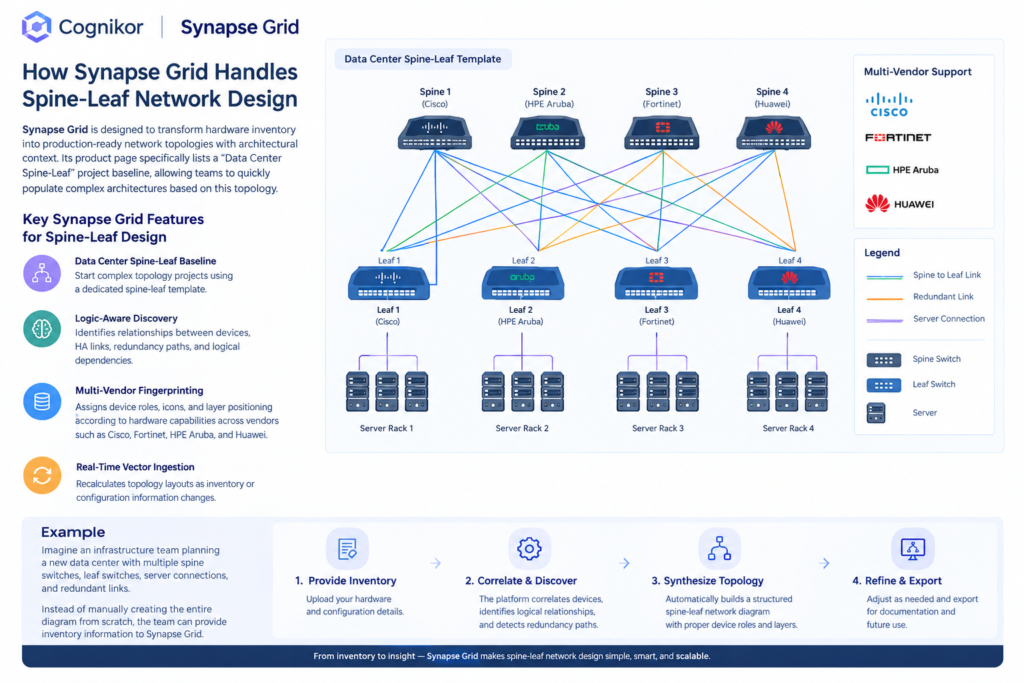
How Synapse Grid Works for Spine Leaf Network Design
A typical spine leaf network design workflow can be broken into four stages: inventory, correlation, synthesis, and export.
Step 1: Add Network Inventory
Synapse Grid allows users to upload CSV information or manually configure vendor counts across operational layers. This provides the underlying hardware information needed for topology creation.
The inventory becomes the foundation for the design rather than requiring engineers to manually recreate every device visually.
Step 2: Correlate Devices and Relationships
The platform’s neural engine identifies relationships such as HA pairs, stack members, and logical boundaries. This helps transform raw hardware information into an architectural model.
For spine leaf environments, this is particularly useful when multiple switches and redundant connections must be represented consistently.
Step 3: Synthesize the Spine-Leaf Topology
Synapse Grid generates structured topology diagrams using automated layout and connection mapping. Its Data Center Spine-Leaf project baseline can be used to populate complex architectures more quickly.
The resulting topology can then be adjusted interactively.
Step 4: Export the Finished Design
Once the architecture is ready, Synapse Grid supports documentation-ready exports in PDF, SVG, PNG, and JPEG formats.
This makes the resulting design suitable for architecture documentation, design reviews, implementation planning, and other infrastructure records.
Spine Leaf Network Design Comparison
Different tools solve different parts of the network-design workflow. A diagramming application may focus primarily on visual creation, while a network source-of-truth platform can focus on infrastructure modeling and documentation.
| Capability | Synapse Grid | Lucidchart | NetBox |
| Spine-leaf design workflow | Yes, with Data Center Spine-Leaf baseline | Network diagramming | Network modeling/documentation |
| Automated topology synthesis | Yes | Primarily visual diagram creation | Data/model driven |
| Hardware data → topology | Yes | Not its primary workflow | Infrastructure modeling |
| HA/redundancy logic | Logic-aware discovery | Primarily represented visually | Models infrastructure relationships |
| Multi-vendor device fingerprinting | Yes | Device shape libraries | Network device data model |
| Real-time topology recalculation | Yes | Diagram editing | Data-driven modeling |
| Large topology support | Thousands of nodes stated by product | Depends on diagram complexity | Designed for infrastructure scale |
| Export | PDF, SVG, PNG, JPEG | Diagram/document formats | Data/API-oriented |
| Pricing | Contact/product-specific | Commercial plans available | Community plus paid Cloud/Enterprise options |
| Primary focus | AI network design and topology synthesis | Visual collaboration and diagramming | Network source of truth |
Lucidchart positions its network-engineering functionality around visualizing and planning infrastructure, including network shapes and Cisco/server-rack libraries. NetBox, meanwhile, is positioned as a network source of truth for modeling infrastructure, devices, cabling, IPAM, and related network data.
Pricing should be evaluated separately because the products use different commercial and deployment models. NetBox Labs currently lists Cloud plans as contact-sales offerings, while NetBox Community is open source; Synapse Grid’s product page does not publish a public price.
The important distinction is therefore not simply price, but what part of the network lifecycle the tool is intended to address.
Benefits of AI-Assisted Spine Leaf Network Design
1. Faster Network Design
Synapse Grid states that network designs can be produced in under two minutes compared with a manually designed process that may take several days.
For teams handling repeated infrastructure-design projects, automated synthesis can reduce the amount of time spent creating diagrams from scratch.
2. Reduced Cabling Errors
Synapse Grid reports a cabling error rate near 0%, compared with a stated manual rate of 15–25%. These figures are product claims rather than independently verified benchmark results, but they illustrate the intended value of automated connection mapping.
Smart cable snapping also helps connections attach to relevant logical ports instead of producing visually confusing diagrams.
3. Better Architectural Consistency
Synapse Grid automatically organizes nodes into architectural layers such as WAN, Edge, Core, Distribution, and Access. It also provides HA boundary logic and visually differentiates link types including 100G fiber, MPLS, copper, and management connections.
This can make complex diagrams easier to interpret during design reviews.
4. Easier Scaling
The platform states that it can handle topologies containing thousands of nodes without performance degradation and includes global node search for distributed multi-site environments.
This is relevant when a simple diagram evolves into a large enterprise topology containing many devices and locations.
Why Spine Leaf Network Design Matters for Modern Data Centers?
Spine-leaf architectures are designed around predictable connectivity between leaf and spine layers. Each leaf connects to the spine layer, creating multiple available paths and supporting scalable east-west traffic patterns.
This makes accurate design representation important. Engineers need to understand which devices belong to each layer, how links are connected, where redundancy exists, and how the topology will change when additional infrastructure is introduced.
Synapse Grid addresses the diagramming and topology-synthesis side of that problem by connecting hardware information with an intelligent visual architecture.
Design Spine-Leaf Networks With Synapse Grid
A well-structured spine leaf network design requires more than drawing spine and leaf icons on a canvas. Network teams need accurate device relationships, redundant paths, logical hierarchy, connection mapping, and documentation that can evolve with the infrastructure.
Synapse Grid combines these requirements into an AI-powered topology-design workflow, supporting inventory ingestion, device correlation, automated synthesis, dynamic editing, multi-vendor identification, and documentation exports.
Explore Synapse Grid and start designing smarter network topologies.
For organizations planning a new data center or modernizing an existing environment, Synapse Grid provides a way to move from raw hardware information toward a structured, visual network architecture.
FAQ’s
Spine leaf network design is a two-layer data center topology consisting primarily of spine and leaf switches. Leaf switches connect endpoints such as servers and storage, while spine switches interconnect the leaf layer.
The architecture is commonly used to provide predictable paths, scalability, redundancy, and efficient east-west connectivity.
A spine-leaf diagram can be created manually using a diagramming tool, or generated from structured infrastructure data using specialized network-design software.
Synapse Grid provides a dedicated Data Center Spine-Leaf project baseline and can synthesize topology diagrams from inventory and device information.
Pricing depends on the platform, deployment model, features, and number of users or devices involved.
For example, NetBox Community is open source, while NetBox Cloud and Enterprise offerings use commercial plans. Synapse Grid’s public product page does not list a specific price, so organizations should contact CogniKor for product-specific pricing.
Yes. Synapse Grid states that its multi-vendor fingerprinting supports environments involving Cisco, Fortinet, HPE Aruba, Huawei, and other vendors. The platform uses hardware capabilities to determine device roles, icons, and layer positioning.
This makes the approach applicable to mixed-vendor infrastructure rather than requiring every device to come from one manufacturer.
Yes. Synapse Grid supports high-resolution PDF and SVG exports and also provides PNG and JPEG output. The product positions these exports as suitable for low-level and high-level design documentation.
Teams can therefore use the generated topology as part of their architecture documentation and infrastructure planning workflow.
Conclusion
Spine leaf network design provides a scalable approach to modern data center networking by separating endpoint connectivity from the high-speed spine layer. Its predictable topology and multiple paths make it suitable for environments with significant east-west traffic.
The challenge is maintaining an accurate representation of that architecture as networks become larger and more complex. Synapse Grid addresses this through automated topology synthesis, logic-aware discovery, multi-vendor fingerprinting, dynamic layouts, and a dedicated Data Center Spine-Leaf baseline.
For teams looking to reduce manual topology work and create documentation-ready network designs, an AI-assisted workflow can connect infrastructure inventory with a structured visual architecture.