

Explore network layer architecture, common design challenges, and how Synapse Grid helps engineers build accurate, scalable network topologies.
Introduction
A reliable enterprise network depends on more than powerful routers, switches, and fast connections. The real challenge is making sure every device, network segment, and communication path works together within a well-organized architecture.
As organizations expand across offices, data centers, and hybrid environments, network layer architecture becomes increasingly difficult to plan. Engineers must consider routing requirements, device placement, traffic movement, redundant connections, and dependencies between infrastructure components.
A small architectural mistake can create unexpected traffic paths, difficult troubleshooting scenarios, or unnecessary complexity during deployment.
This is why modern network design requires both a clear understanding of networking layers and an accurate representation of the physical and logical infrastructure.
Synapse Grid by CogniKor helps address these design and visibility challenges. Its AI-powered topology capabilities transform network hardware information into structured diagrams, making it easier for engineering teams to review complex connections before implementation.
What Is Network Layer Architecture?
Network layer architecture describes how networking functions, communication pathways, and infrastructure components are organized to support data transfer between devices and networks.
In the OSI reference model, the network layer is Layer 3. It handles logical addressing and packet forwarding between separate networks, with Internet Protocol (IP) playing a central role.
However, enterprise infrastructure design also uses architectural layers to organize network devices according to their operational responsibilities.
These two concepts are related but different:
- OSI Layer 3: Defines network-level functions such as IP addressing, routing, and packet forwarding.
- Enterprise architecture layers: Organize infrastructure into functional sections such as access, distribution, core, edge, and WAN.
- Network topology: Represents the connections and relationships between physical and logical networking components.
Understanding these distinctions matters because a functional network design must account for protocols and actual device relationships.
For example, two routers may both operate at Layer 3, yet serve completely different purposes within an organization’s infrastructure.
A detailed architectural view makes these differences easier to identify.
How Does Network Layer Architecture Work?
Network communication follows a series of decisions that determine where information should travel and which devices should handle it.
When a device sends data to another network, its traffic typically passes through a default gateway. Routing devices examine destination IP information and use routing tables to select an appropriate next hop.
Depending on the network design, the traffic may cross distribution switches, core routers, firewalls, WAN infrastructure, or other intermediate systems. Consider a business with two separate office buildings.
An employee in Building A needs to access an application hosted in Building B.
The communication process may involve:
- Source identification: The sending device determines whether the destination belongs to its local network.
- Gateway forwarding: Traffic intended for another network is sent to an appropriate gateway.
- Route selection: A routing device chooses a next hop based on available routing information and applicable policies.
- Infrastructure traversal: Packets travel through the relevant network connections.
- Destination delivery: The destination network forwards the packets toward the receiving device.
Actual packet movement depends on routing configurations, network conditions, and security controls.
For engineers, understanding these operations is only part of the challenge. They must also visualize how the participating devices are connected.
An accurate topology can help reveal whether important traffic paths depend on a single device, whether redundant connections exist, and where architectural changes may have an impact.
Understanding the Main Layers of Enterprise Network Design
Enterprise architectures commonly separate infrastructure into functional layers. The exact arrangement depends on network size, operational requirements, and deployment environments.
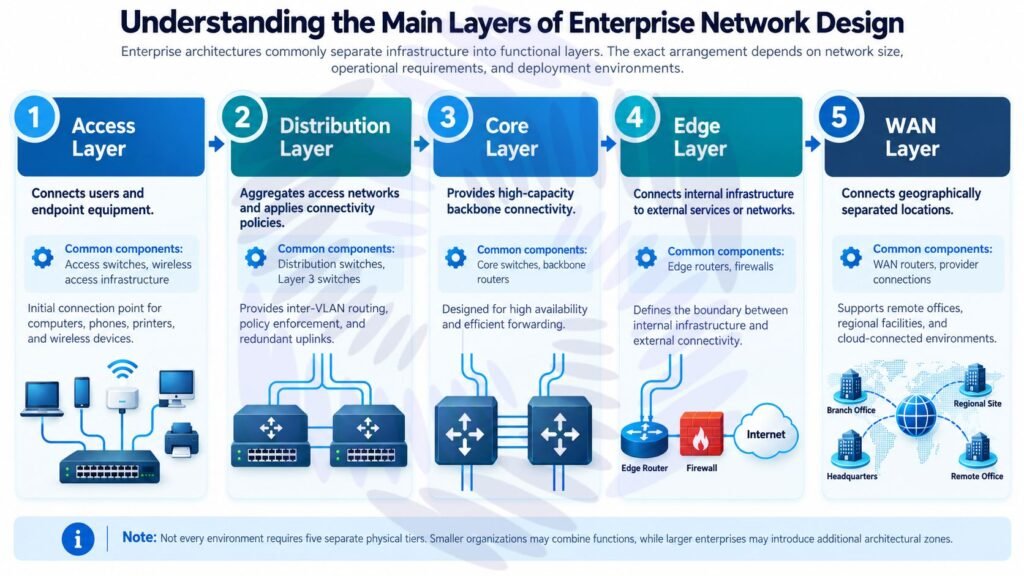
| Architecture Layer | Primary Responsibility | Common Components |
| Access | Connect users and endpoint equipment | Access switches, wireless access infrastructure |
| Distribution | Aggregate access networks and apply connectivity policies | Distribution switches, Layer 3 switches |
| Core | Provide high-capacity backbone connectivity | Core switches, backbone routers |
| Edge | Connect internal infrastructure to external services or networks | Edge routers, firewalls |
| WAN | Connect geographically separated locations | WAN routers, provider connections |
Not every environment requires five separate physical tiers. A smaller organization may combine functions, while a larger enterprise may need additional architectural zones.
1. Access Layer: Connecting Network Endpoints
The access layer provides the initial connection point for computers, phones, printers, wireless infrastructure, and other endpoint devices.
Its design must accommodate endpoint capacity, uplink requirements, and suitable network segmentation.
A common challenge arises when growing businesses add access switches without updating the wider infrastructure documentation.
Over time, engineers may struggle to identify which access devices connect to which upstream equipment.
Maintaining a structured device hierarchy helps reduce this confusion.
2. Distribution Layer: Organizing Connectivity
The distribution layer brings together traffic from access networks and may provide inter-VLAN routing, policy enforcement, and redundant uplinks.
Because it serves multiple downstream devices, incorrect connections or unclear dependencies at this layer can affect a significant portion of the infrastructure.
Network teams should be able to identify upstream and downstream relationships without manually tracing every line across a large diagram.
3. Core Layer: Supporting Backbone Connectivity
The core layer connects major areas of an enterprise network and is generally designed for high availability and efficient forwarding.
Architectural decisions at this level are particularly important because core infrastructure can support multiple departments, buildings, or services.
During design reviews, engineers should examine redundant connectivity and identify critical paths that require additional validation.
4. Edge Layer: Managing External Connectivity
The edge layer forms the connection between internal infrastructure and external networks, including Internet services and third-party connections.
Firewalls, perimeter routers, and related networking equipment often appear in this architectural zone.
Accurate topology documentation helps teams understand where connectivity boundaries exist and which infrastructure components depend on external connections.
5. WAN Layer: Connecting Distributed Locations
The WAN layer supports communication between remote offices, regional facilities, cloud-connected environments, and other geographically separated locations.
With multiple sites involved, maintaining a consistent view of device relationships becomes increasingly important.
A clear architecture can distinguish different connection types and help engineers understand how locations relate to one another.
Why Network Layer Architecture Becomes Difficult to Manage
Most architecture problems develop gradually as businesses expand their infrastructure.
A network may begin with a few switches and routers, but additional sites, vendors, and connectivity requirements introduce relationships that are difficult to track manually.
The following challenges frequently affect infrastructure design teams.
| Network Design Challenge | Potential Consequence | Design Requirement |
| Outdated topology diagrams | Incorrect assumptions during planning | Documentation that can be updated |
| Unclear device relationships | Slower architecture reviews | Logical connection mapping |
| Complex redundant links | Difficult high-availability validation | Visible redundancy paths |
| Mixed hardware vendors | Inconsistent device representation | Standardized device identification |
| Large device inventories | Time-consuming manual diagram creation | Automated topology organization |
| Unstructured cabling diagrams | Connection planning errors | Clear port and link representation |
These challenges do not always indicate a malfunctioning network.
Instead, they often reveal a gap between the actual infrastructure and the information available to the engineering team.
Closing that gap requires a more systematic approach to architecture design.
How Synapse Grid Helps Solve Network Architecture Challenges?
Synapse Grid is an AI-powered network design platform developed by CogniKor to transform hardware information into structured, interactive network topologies.
Rather than requiring engineers to manually position every device and draw every connection, the platform uses inventory information and architecture-aware processing to assist with topology generation.
Its capabilities are especially relevant when network architecture includes multiple device types, vendors, and redundant connections.
Organize Network Devices into Appropriate Layers
One difficulty in enterprise architecture design is deciding how to display hundreds of devices without producing an unreadable diagram.
Synapse Grid uses dynamic hierarchy capabilities to organize infrastructure across WAN, Edge, Core, Distribution, and Access layers.
This helps engineers establish a structured overview of the infrastructure and review device placement within the broader architecture.
Identify Device Relationships and Dependencies
A list of switches, routers, and firewalls cannot fully explain how a network is connected.
Synapse Grid’s logic-aware discovery identifies device relationships, high-availability connections, redundancy paths, and logical dependencies.
These relationships provide useful context when reviewing network connectivity.
For instance, an engineer assessing a redundant distribution design can examine its architectural representation instead of interpreting device names alone.
Standardize Multi-Vendor Network Visualization
Enterprise infrastructure often contains equipment from multiple manufacturers.
Synapse Grid provides multi-vendor fingerprinting that assigns device roles, icons, and architectural positions based on hardware capabilities.
Its published product information identifies support for equipment from vendors including Cisco, Fortinet, HPE Aruba, and Huawei.
This allows mixed-vendor architecture designs to follow a more consistent visual structure.
Improve the Clarity of Network Connections
Complex diagrams can become difficult to understand when numerous links overlap or cross unrelated devices.
Synapse Grid uses smart cable snapping to align links with relevant logical ports.
It also provides visual differentiation between connection types, including fiber, MPLS, copper, and management links.
These features help make dense infrastructure diagrams easier to interpret during design reviews.
Adapt Architecture Diagrams to Changes
Network architecture is rarely static.
New devices are introduced, infrastructure is expanded, and existing connections are modified.
Synapse Grid supports interactive topology updates and layout recalculation when network inventory or configurations change.
This can reduce the repetitive diagram-adjustment work associated with architecture revisions.
Manual Network Design vs. AI-Assisted Network Architecture
The choice between manual and AI-assisted workflows can have a significant impact on how efficiently a team prepares its network diagrams.
| Design Activity | Traditional Manual Approach | Synapse Grid Approach |
| Device arrangement | Individual placement | Automated hierarchy organization |
| Topology creation | Manual connection drawing | AI-assisted topology synthesis |
| Redundancy visualization | Engineer-defined annotations | Logic-aware relationship mapping |
| Vendor representation | Manual symbol selection | Multi-vendor fingerprinting |
| Diagram modification | Manual layout adjustments | Interactive layout recalculation |
| Large topology navigation | Manual diagram searching | Global node search |
| Documentation output | Manual preparation and export | Multiple supported export formats |
These differences primarily relate to the design and documentation workflow.
Synapse Grid should not be confused with a routing protocol, packet-forwarding engine, or replacement for production network configuration and testing.
Its value lies in helping teams understand and represent infrastructure architecture more efficiently.
FAQ’s
Synapse Grid converts hardware information into organized network topology diagrams. Its capabilities include dynamic layer organization, device relationship mapping, redundancy visualization, and interactive topology updates.
Yes. Synapse Grid includes multi-vendor fingerprinting capabilities and identifies support for equipment from vendors such as Cisco, Fortinet, HPE Aruba, and Huawei. Specific model compatibility should be verified for a planned deployment.
Its published functionality focuses on network topology design, architecture visualization, and documentation. These capabilities alone do not imply automated production device configuration.
Synapse Grid is designed to support large topologies with thousands of nodes. It also provides elastic scaling and global node search to help users navigate complex, distributed infrastructure designs.
Synapse Grid supports exporting diagrams as PDF, SVG, PNG, and JPEG files. These formats can be used for architecture reviews, network documentation, and implementation planning.
Conclusion
Effective network layer architecture requires more than understanding how packets move between devices. It also requires a clear representation of how infrastructure components are arranged, connected, and maintained.
As enterprise environments expand, manual architecture documentation can become a major operational challenge. Unclear dependencies, mixed-vendor hardware, and complicated redundancy relationships can make it harder for engineering teams to prepare and review network designs.
CogniKor’s Synapse Grid addresses these challenges with AI-assisted topology creation, structured network hierarchy, logical relationship discovery, multi-vendor visualization, and documentation-ready exports.
By combining intelligent design assistance with engineering review, organizations can build a clearer architectural foundation for future network changes.
Ready to simplify your network architecture design?
Explore Synapse Grid or visit CogniKor to learn how AI-assisted infrastructure design can support your network engineering workflow.