Simplify data center topology design with Synapse Grid. Turn hardware inventory into intelligent network topologies, map connections, and export designs.
Introduction
As data center environments become larger and more interconnected, designing a clear network topology is becoming increasingly difficult. Engineers must account for devices, network layers, redundant connections, hardware relationships, and continuous infrastructure changes. AI-assisted topology design offers a more efficient approach by turning hardware and network information into structured, interactive architectures. Synapse Grid applies this approach to help teams map device relationships, organize network layers, visualize connectivity, and create documentation-ready data center topology designs.
How AI Is Changing Data Center Topology Design
Data center topology design defines how switches, routers, firewalls, servers, links, and other network components are organized and connected. As environments grow, manually creating and maintaining these designs becomes increasingly difficult.
Synapse Grid helps address this challenge by transforming hardware and network information into structured, interactive topology designs. Its AI-powered engine can identify device relationships, redundancy paths, logical dependencies, and network layers while helping engineers produce documentation-ready architecture diagrams.
The Problem with Traditional Data Center Topology Design
Designing a large data center network requires more than placing devices on a diagram. Engineers must understand hardware capabilities, identify relationships, plan redundant paths, organize network layers, and keep documentation synchronized with infrastructure changes.
When these activities are performed manually, topology design can become time-consuming and difficult to maintain.
- ❌ Manually placing hundreds or thousands of devices can consume engineering time.
- ❌ Complex connections can create confusing or difficult-to-maintain diagrams.
- ❌ HA pairs, stacks, and redundancy relationships may be difficult to represent consistently.
- ❌ Network changes can quickly make static topology diagrams outdated.
The impact goes beyond diagram appearance. Outdated or poorly organized topology documentation can make infrastructure reviews, implementation planning, troubleshooting, and future expansion more difficult.
A Smarter Approach to Data Center Topology Design
Modern data center topology design can use automation to transform raw infrastructure information into an organized network architecture.
Instead of starting with an empty canvas, engineers can begin with hardware inventory and allow an intelligent design platform to analyze devices, relationships, roles, and network layers.
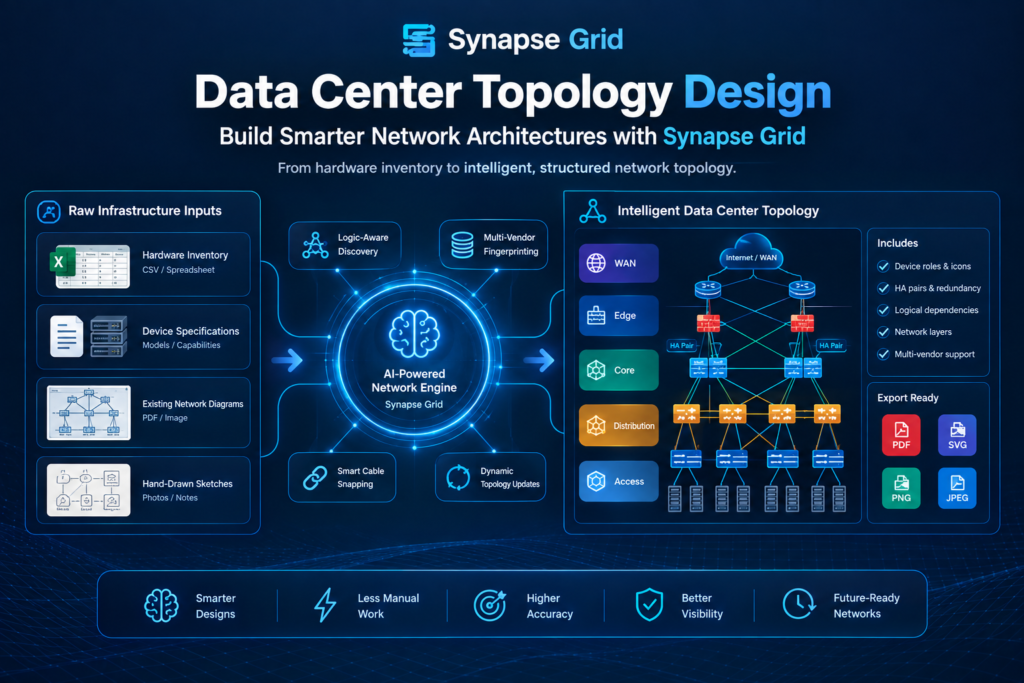
Synapse Grid follows this approach. Its workflow moves from Inventory → Correlation → Synthesis → Export, helping convert infrastructure information into a structured topology.
| Traditional Approach | Modern AI-Assisted Approach |
| Manually place devices | Automatically organize infrastructure |
| Manually identify relationships | Detect logical relationships |
| Draw connections individually | Automate connection mapping |
| Organize layers by hand | Automatically structure network hierarchy |
| Rebuild diagrams after changes | Dynamically recalculate topology |
| Prepare documentation separately | Export documentation-ready designs |
This does not remove the network engineer from the process. Instead, automation handles repetitive design work while engineers review, validate, and refine the resulting architecture.
How Synapse Grid Solves Data Center Topology Design?
Synapse Grid is specifically suited to topology-focused network design because it works with the relationships between devices rather than treating the diagram as a collection of disconnected shapes.
Its logic-aware discovery can identify high-availability links, redundancy paths, logical dependencies, and other relationships. It also supports dynamic topology interaction and multi-vendor hardware fingerprinting.
Key Features for Data Center Topology Design
- Logic-aware discovery: Identifies HA links, redundancy paths, and logical dependencies to give the topology more architectural context.
- Dynamic network hierarchy: Organizes devices into WAN, Edge, Core, Distribution, and Access layers.
- Multi-vendor fingerprinting: Helps assign device roles, icons, and positioning according to hardware capabilities.
- Smart cable snapping: Connects links to relevant logical ports to help keep complex topology diagrams organized.
Example: Designing a Data Center Network
Consider an enterprise data center containing core switches, distribution devices, firewalls, WAN equipment, management links, and redundant infrastructure.
Instead of manually creating every device and connection, the engineering team can provide the available inventory. Synapse Grid can then analyze the hardware, identify relationships, organize network layers, and synthesize the topology into a structured architecture.
The resulting design gives engineers a clearer starting point for reviewing connectivity, redundancy, hierarchy, and documentation.
How Synapse Grid Works for Data Center Topology Design?
The Synapse Grid workflow is designed to take infrastructure information through several stages before producing the final topology.
Step 1: Add Network Inventory
Start by providing the hardware information for the project. Synapse Grid supports CSV-based inventory input and allows users to work with vendor and device information across operational layers.
This gives the platform the raw information required to understand the infrastructure being designed.
Step 2: Correlate Device Relationships
The system analyzes the available infrastructure and identifies relationships between devices.
This can include HA pairs, stack members, logical boundaries, and dependencies. The objective is to give the topology meaningful architectural context rather than simply displaying individual devices.
Step 3: Synthesize the Topology
Synapse Grid converts the analyzed information into a structured network topology.
Its dynamic hierarchy can organize nodes into architectural layers, while hardware-aware fingerprinting helps determine device roles, icons, and positioning.
Step 4: Map Connections
Connections can be represented through intelligent link mapping and Smart Cable Snapping.
The platform also provides visual differentiation for link types such as 100G Fiber, MPLS, Copper, and Management connections, helping engineers understand the infrastructure more easily.
Step 5: Review and Modify the Architecture
Topology elements remain interactive. Synapse Grid states that modifying a node or link can trigger real-time path recalculation while maintaining structured diagrams.
This makes the design more useful when engineers need to explore changes rather than working with a static image.
Step 6: Export the Completed Design
Once the architecture is reviewed, the topology can be exported into PDF, SVG, PNG, and JPEG formats. CogniKor specifically positions PDF and SVG outputs for HLD and LLD documentation.
Synapse Grid vs Traditional Data Center Topology Tools
Different tools address different parts of data center design. General diagramming platforms such as Lucidchart and diagrams.net are commonly used for visual documentation, while specialized platforms can focus on areas such as physical data-center design, CFD simulation, or automated network infrastructure.
For example, Lucidchart focuses heavily on collaborative diagram creation, while diagrams.net provides browser/desktop diagram editing and infrastructure-oriented stencil libraries.
Synapse Grid’s focus is different: AI-assisted network topology synthesis from infrastructure information.
| Capability | Synapse Grid | General Diagramming Tools | Specialized Data Center Design Platforms |
| Network topology design | AI-assisted | Primarily manual | Varies |
| Hardware inventory as input | Yes | Generally diagram-focused | Varies |
| HA relationship discovery | Yes | Typically manual | Varies |
| Network hierarchy | Automated structure | Usually manual | Varies |
| Multi-vendor hardware | Yes | Symbol/library dependent | Varies |
| Dynamic topology updates | Yes | More manual | Varies |
| Smart connection mapping | Yes | Connector-based | Varies |
| PDF/SVG documentation export | Yes | Common | Varies |
| Physical facility/CFD simulation | Not its stated focus | No | Some platforms |
| Network architecture synthesis | Core capability | Limited | Depends on platform |
This distinction is important. A data center team looking for physical facility planning, cooling simulation, or structural engineering needs a different class of software. For example, Cadence
Reality DC Design focuses on physics-based CFD and digital-twin modeling, while Schneider
Electric’s EcoStruxure IT Design CFD focuses on airflow and cooling optimization.
Synapse Grid is focused on the network architecture and topology side of the problem.
Benefits of AI-Powered Data Center Topology Design
1. Reduce Manual Design Work
Traditional topology creation can require engineers to repeatedly place devices, draw connections, organize layers, and clean up diagrams.
Synapse Grid automates significant parts of this process by using infrastructure information to generate a structured topology, allowing engineers to concentrate more on architectural review.
2. Improve Topology Consistency
Large network diagrams can become difficult to maintain when every connection and device is positioned manually.
Logic-aware discovery, dynamic hierarchy, and Smart Cable Snapping help maintain a more structured representation of complex infrastructure.
3. Make Complex Relationships Easier to Understand
HA pairs, redundant paths, stacks, and logical dependencies are important elements of a data center network.
Synapse Grid is designed to identify these relationships and represent them within the topology, providing more context than a basic collection of device icons.
4. Support Large-Scale Infrastructure
Enterprise environments can contain thousands of nodes across multiple locations.
Synapse Grid includes elastic scaling for large topologies and Global Node Search for locating devices within distributed infrastructure.
5. Keep Designs Current
Infrastructure changes constantly. Devices are added, removed, replaced, or reconfigured.
Synapse Grid’s real-time vector ingestion and dynamic topology capabilities are designed to recalculate the topology as inventory or configurations change.
6. Simplify Documentation
A topology is often needed beyond the initial design stage. Engineering teams may require diagrams for HLDs, LLDs, implementation planning, reviews, and infrastructure documentation.
Synapse Grid can export designs into PDF, SVG, PNG, and JPEG, making the resulting architecture easier to distribute and document.
A Practical Data Center Topology Design Example
Imagine an organization is designing a new enterprise data center with:
- Core switches
- Distribution switches
- Access infrastructure
- Firewalls
- WAN connections
- Management networks
- Redundant devices
- Multiple vendors
Traditional Workflow
An engineer may need to manually:
- Review the hardware inventory.
- Identify each device type.
- Determine device roles.
- Organize network layers.
- Identify HA relationships.
- Draw connections.
- Clean up the topology.
- Review redundant paths.
- Update the design when infrastructure changes.
- Prepare final documentation.
Synapse Grid Workflow
With Synapse Grid, the process can instead begin with inventory.
The platform then moves through:
Inventory → Correlation → Synthesis → Export
During this process, it can identify relationships, organize network hierarchy, map connections, support multi-vendor hardware, and produce exportable topology documentation.
The network engineer remains responsible for reviewing and validating the architecture, while Synapse Grid handles much of the repetitive topology construction.
Data Center Topology Design for Spine-Leaf Architectures
Modern data center networks frequently use structured architectures such as spine-leaf designs. Juniper’s current data-center documentation, for example, describes multiple data-center topology models including three-stage Clos, collapsed data-center fabric, five-stage Clos, and architectures with access-layer support.
This makes clear topology visualization particularly important.
With Synapse Grid, a project can use templates such as Data Center Spine-Leaf as a project baseline, allowing teams to quickly populate complex architectures.
The resulting topology can then be reviewed, modified, searched, and exported for project documentation.
FAQ’s
Data center topology design is the process of defining how network devices and connections are organized within a data center. It covers device relationships, network hierarchy, connectivity, redundancy, and logical dependencies.
A well-structured topology gives engineers a visual representation of how infrastructure fits together and supports planning, implementation, documentation, and future changes.
Synapse Grid converts hardware and network information into structured topology designs. It can identify relationships such as HA pairs and redundancy paths while organizing devices into logical network layers.
It also supports dynamic topology changes, multi-vendor hardware, intelligent connection mapping, and documentation-ready exports.
Yes. Synapse Grid includes multi-vendor fingerprinting and CogniKor states that its network design capabilities support environments involving vendors such as Cisco, Fortinet, HPE Aruba, Huawei, and others.
This makes it suitable for organizations that do not operate a single-vendor network environment.
Synapse Grid includes an Elastic Scaling capability designed for large-scale topologies with thousands of nodes. It also provides Global Node Search for locating specific devices within distributed topologies.
This can be useful for enterprise environments where manually navigating a large topology becomes increasingly difficult.
The public Synapse Grid product information reviewed for this article describes its capabilities and workflow but does not publish a standard price. Organizations should contact CogniKor for current commercial terms based on their infrastructure requirements.
Pricing should therefore be evaluated alongside factors such as topology scale, deployment requirements, supported infrastructure, and documentation needs.
Start Designing Smarter Data Center Topologies
Data center topology design becomes increasingly complex as infrastructure grows across devices, vendors, network layers, and redundant connections.
Synapse Grid provides an AI-assisted approach that turns infrastructure information into structured network architecture, helping teams discover relationships, organize topology layers, map connections, manage large designs, and produce documentation-ready outputs.
For teams planning a new data center topology or modernizing an existing network architecture, Synapse Grid provides a workflow that moves from inventory and correlation to topology synthesis and export.
Conclusion
Effective data center topology design requires more than drawing devices and connecting lines. Engineers need to understand hardware roles, network hierarchy, redundancy, logical relationships, connectivity, and how the architecture will evolve over time.
Synapse Grid addresses these requirements with AI-assisted topology synthesis, logic-aware discovery, dynamic hierarchy, multi-vendor fingerprinting, Smart Cable Snapping, elastic scaling, and documentation-ready exports.
By automating repetitive topology-design tasks, Synapse Grid can help network teams move from raw infrastructure information toward a clearer, more structured network architecture while keeping engineers involved in reviewing and validating the final design.